
How to Make your Website Much, Much(!) Faster

Site speed is important. Really important, in fact.
On one level, this is self-intuitive. If you’ve ever clicked on a website link and twiddled your thumbs while the wheel timer of death spins, you’ll know why. The longer a slow site takes to load, the more likely that your users will just hit the ‘Back’ button and give up on your website (according to Kissmetrics, 40% of people will abandon ship if your site takes longer than 3 seconds to load).
But there’s a more technical side to your website speed than that. You see, search engines really care about your site speed, too. Site speed is an increasingly important factor amongst the many mysterious facets that improve your search engine performance. Google and co don’t want to serve their searchers slow-loading pages and websites.
So both your user experience and your SEO will suffer if your site isn’t performing fast enough. Does this worry you, at all? Ever wished your site could be just that little bit quicker, but find yourself overwhelmed with technical details when you try to do something about it?
Well, you’ve come to the right blog post! Here are some of our very best, beginner-friendly tips on pumping up your site speed numbers.

Before we start…
Speaking of numbers…
Before we dive into the technical ways you can improve your site speed, you should use an industry standard speed testing tool. That way, you can know exactly where your site stands. In numbers.
There are a whole bunch of these that will do the job. Google offer their own tool called PageSpeedInsights, or you can use third party tools such as Pingdom or GTMetrix. If you want our opinion, PageSpeed Insights is probably the most reliable, GT Metrix offers the most detail (which can be quite technical), while Pingdom is the most user-friendly of the bunch.
Whichever you choose, these tools are very good at giving you an unbiased standard of how fast your site really is, and how it compares to the vast majority of other websites. They’ll also give you some tips on improving your speed. Some of these are admittedly very technical, but we’re trying to keep things as simple as possible for this article, as a starter for ten.
Armed with your current page speed score, you’re ready to get started, as you’ll now have a reference point with which to test the effectiveness of the measures you’ll be putting into play!
1. STOP PLUGGING THINGS IN…
One of the biggest reasons for website speed being sluggish that we see here at Saint Digital is that websites have had too many plugins installed onto them, torpedoing the site load speed.
You should really do your utmost to ensure that only the most essential plugins are installed on your web server. Not only do plugins take up a lot of bandwidth, slowing down your site, but they can also pose security risks as hackers try to exploit vulnerabilities in the third party code in plugins.
Being hacked is not worth having all the most flashy plugins on your domain. You should try to only have one plugin for each purpose – for example, one caching plugin, one for SEO, one for site security, and so on.
When is it worth biting the bullet and installing a plugin?
Generally, plugins should only be used for improving site functionality, rather than the aesthetics of your site.
Without getting too technical, the look and feel of your site can be tweaked easily with straightforward CSS code, while adding new functionality (such as e-commerce or job search features, to what was previously a brochure website) will require adding a plugin. As long as you stick to the rule that ‘my plugins are for new functionality for my website’, and you’re not looking for plugins to add bells and whistles (things like new shortcodes, and animations) you shouldn’t go far wrong with this.
2. …Apart from these things
There are some plugins that your site can’t go without, particularly from a site speed optimisation perspective.
Chief amongst these is a caching plugin. Caching is quite a complex technology, but without getting too technical, making sure your website supports caching will make it a lot faster. That’s because it will store data that’s frequently accessed, so your web browser can re-use it, without having to fully reload it. That means stuff like images, videos, scripts and fonts. At Saint Digital, we use and recommend W3 Total Cache, but WP Super Cache and WP Rocket are also very popular choices for webmasters.
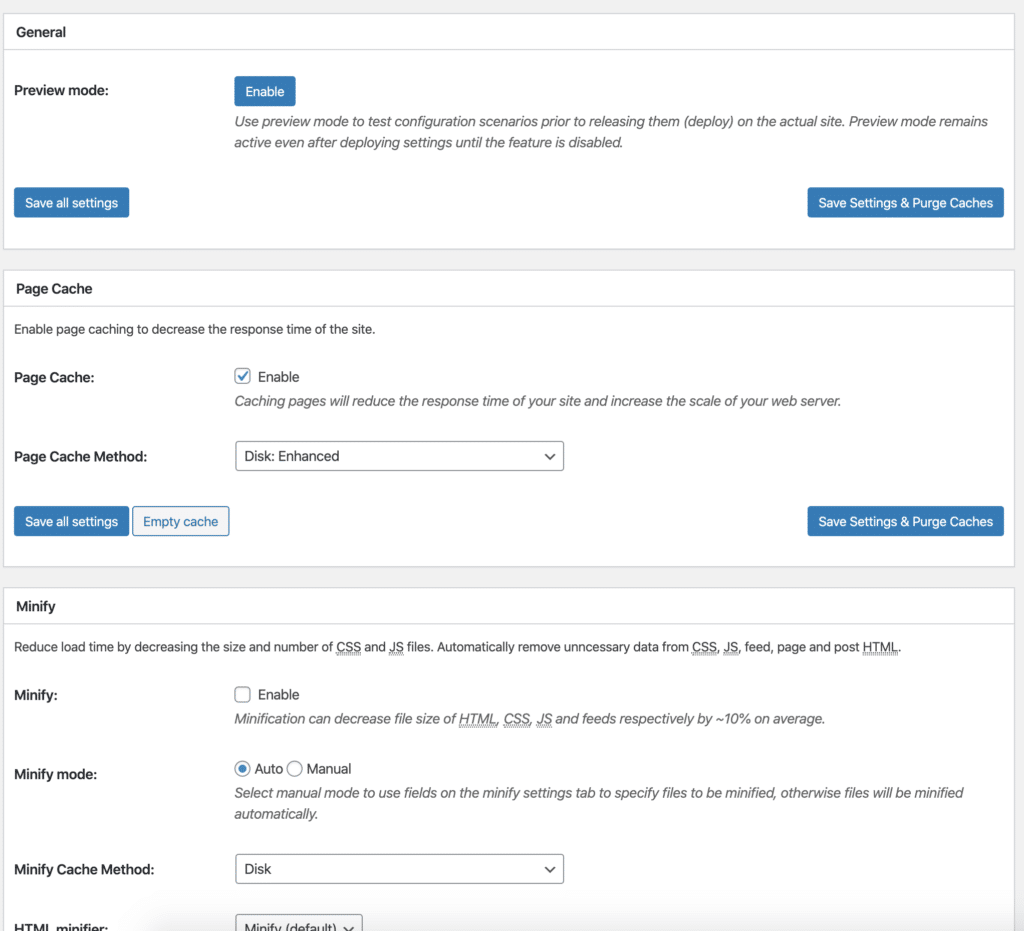
W3 and other caching plugins generally allow you to access powerful speed-enhancing settings with the push of a button. Generally, we recommend all websites utilise page and database caching, at the very least, and then trial CSS/JS minification (carefully, to ensure it doesn’t break the experience of your site).
You’ll also want to consider a plugin to make your images more web-friendly. Many images are far higher resolution than they need to be to display well on your website. To help you with this, the brains of the Internet have created plugins such as Smushit, which ensures your images are exactly the size they need to be to display well, without wasting space.
Finally, you could consider a more general performance plugin, which will keep an eye on the whole picture of your site speed and make recommendations on areas for improvement. Hummingbird is the pick of the bunch in our book, and it’s made by the same people who did Smush, so you avoid the problem of different plugins treading on each other’s toes. Hummingbird offers the opportunity to scan your full website and make quick optimisation changes with the push of a button. It’s been built to consider your site’s performance, from A to Z, and it’s a worthy addition to your list of plugins.
3. CONSIDER YOUR WEB HOSTING PACKAGE
Your hosting package is one of the biggest factors that will decide how quickly your site loads – but it’s also one of the options on our list which unavoidably comes with a cost. If you plumped for an economical hosting package, just to get your business site up and on the road, it’s more than likely that you’re on a shared hosting package, which – as it sounds – means that you’ll share your bandwidth with other websites on the same webserver. Obviously, this places you at the lower end as far as site speed goes, but you know what? For most businesses, this is more than adequate.
Shared hosting’s big brother is dedicated hosting, which means your site will have a dedicated server, all of its own. Generally, we only recommend this if your site is more than a “brochure website”- for example if it has e-commerce functionality or other more complicated processes to perform than just displaying content; if it has a decent amount of monthly traffic (500-1,000 users or more); or if site speed is a particularly important issue to you for whatever reason.
These are not hard and fast rules, of course, and the choice is yours as a webmaster to make.
Some websites are just more demanding than others, and depending on the amount and type of multimedia you want to display on your site (with high-resolution images and things like sliders being particularly intensive), you might decide to upgrade to dedicated hosting sooner than others would. In any case, upgrading your hosting will certainly make a noticeable difference in your site speed.
While we’re on the topic, if you’re not doing so already, you should really be on a hosting package that’s optimised for the kind of website you’re running. Sometimes, clunkiness can be the result when hosting is not optimal to support your website setup. That means if you’re on WordPress, it’s best to look for a host that mentions WordPress.
Hosting packages that are tailored to your particular build of website will generally give you much better value and performance than more general offerings.
4. AND CONSIDER Content Delivery Networks
We couldn’t write a post about site speed without including a small bit of jargon, now, could we?!
Content Delivery Networks, or CDNs for short, are basically a collection of high-performing servers around the world. When you enlist a CDN for your website, what that means is that your site will always try to serve your content to users from one of the servers that is most local to them, meaning (in an ideal world) a user in China will receive the content quicker as they’ll be delivered the content from somewhere in China, rather than from wherever your host is based (in our case, that’s the USA).
Unfortunately, CDNs do get rather expensive if your site is on the larger side of things, as global networks of servers aren’t cheap to maintain. But that doesn’t mean they won’t be worth the investment, or indeed, that they won’t make a very noticeable impact on your site speed. In fact, if your website has a large global audience, you’ll almost certainly get a great return on your investment in a CDN. Many of the world’s biggest and most popular websites are using CDNs, partially for site speed but also for website security, which is also greatly enhanced by this method of content delivery.
It’s worth doing more extensive research on CDNs as we can’t cover it all here, but we can recommend a few providers we’ve used before, who deliver a reliable service:
It’s worth taking the time to review each option thoroughly. Speaking from experience, we can confirm that all three have reliable and helpful support – so be sure to use this! Ask their support team key questions before committing. Tell them who your audience are, what your site does, and (if you know this) where the average site visitor will be browsing from, particularly if you have access to international markets.
Every website is different and the optimal solution won’t be the same for different businesses. You’ll also be able to compare on price and decide which option offers the most bang for your buck. Not sure where to start with your particular website setup? Talk to us, and we’ll hopefully be able to point you in the right direction for your website size, its traffic and your future requirements and plans for your business.
5. Use Third Party Hosting for Videos
One common error we often see websites making is to try to host their own videos. Although this might look good, and means you won’t have a link to an external host, videos are some of the most memory-intensive multimedia you can have on your website. There’s a reason YouTube cost an estimated $700m to run for one year – and that was back in 2009 (so it’s guaranteed to be way more now…).
So, with few exceptions, we’d recommend that you look to a third party video host like YouTube, Vimeo, or Wistia. You probably already know about YouTube and Vimeo! Wistia is custom built for marketers and gives you a lot of customisation options – buuuut you only have 3 free videos on the platform, before you need to switch to their paid plan.
Embedding your video from these sites is as straightforward as it gets. In the case of YouTube and Vimeo, you can now just copy and paste the link into your WordPress visual editor and it’ll be automatically turned into an embedded video!
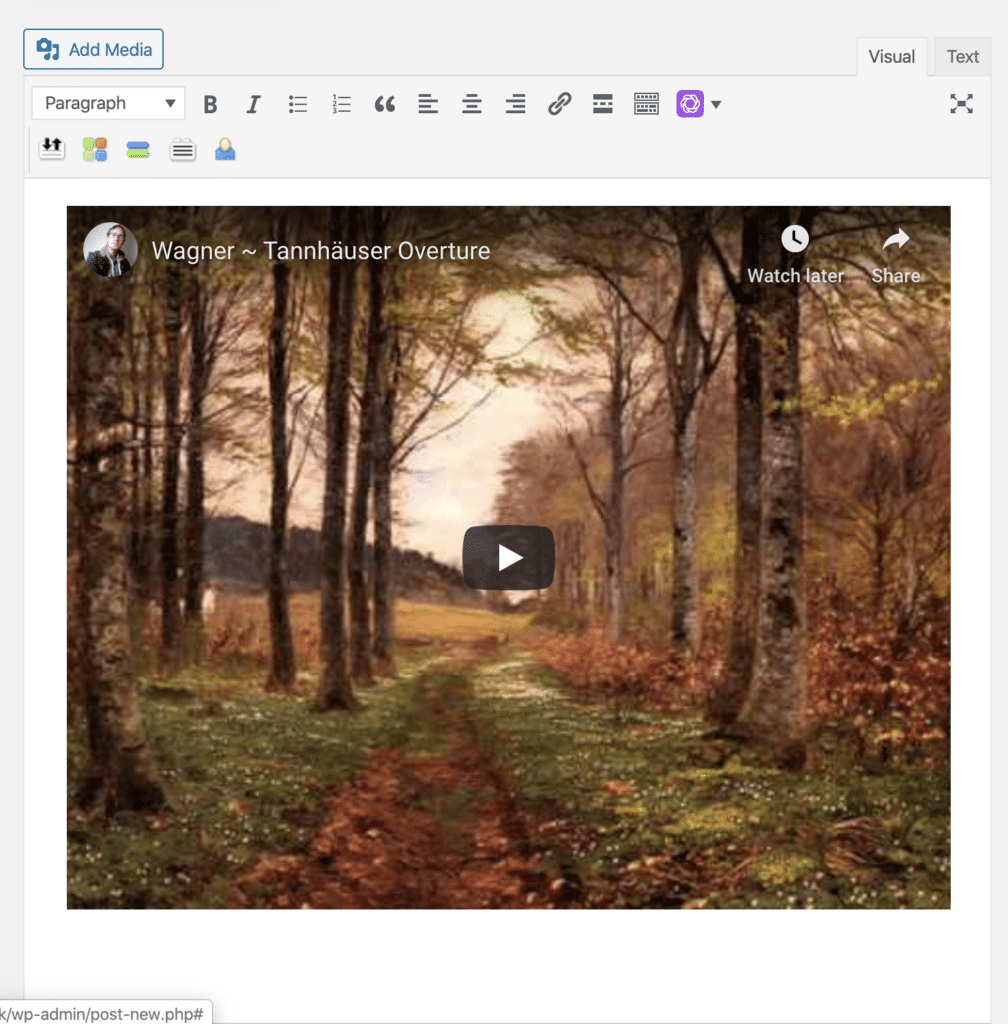
To fill our post with a Wagnerian masterpiece, all we had to do was copy > paste the URL in our browser from YouTube into the WordPress visual editor. A cinch!
Many marketers shirk the idea of using third party video providers, worried that having links to external websites will harm their own site engagement. Although we understand the thinking here, we think the benefits outweigh the cost in this case.
There’s no doubt hosting your videos elsewhere will save you a lot of precious bandwidth on your site. Plus, if you’re trying to build clout on large video websites such as YouTube or Vimeo, there’s no harm if users on your site do click through to your channel, is there? It might mean a few new subscribers, views, and thumbs up, allowing you to appear in more content searches in future.
Conclusion…and a confession
We’d like to conclude this article right here, thank you for your time, and send you on your way. But before we do that, er ( *clears throat*)… we have a small confession to make.
There’s quite a lot of things that we’ve left out in this article – and we’ve done so quite knowingly.
The thing is, it’s quite tough to talk about site speed in language that absolutely everybody can fully understand, as there’s so much technicality to some of the finer details. We could have talked about .GZIP compression, minifying your CSS / JS files, and enabling browser caching… and some of the more technically minded webmasters out there might well have lapped it up.

We feel you, techies. We do. But the chances are many other folks – people who just want to learn a thing or two about site speed without swallowing a dictionary of jargon – would have gone running for the hills just as quickly! So, we’ve kept it nice and simple here.
Frankly, all the average webmaster will need to do to improve their site speed noticeably is to follow the tips above: grab a hosting package that’s just right for their business, install a great caching plugin and optimise their images, otherwise keep plugins to the bare minimum, and (perhaps) consider a CDN.
We might delve into a more technical exploration of site speed optimisation another time on on this blog, for the techies – but that’s for another day (sorry, folks!).
For an exhaustive audit of how your website is performing in relation to your competition, and what might be the culprit for slowing it down, or if you’re a bit of an obsessive and want to hit the top end of the score system on Page Speed Insights don’t hesitate to book a free consultation con Santos, as the Spanish might say (they don’t, but they might!). We can take care of the technical side of optimising your website speed, so you don’t have to.

- How to redesign your site without losing SEO - December 12, 2025
- Is your business invisible to ChatGPT? The rise of Answer Engine Optimisation - December 9, 2025
- The Zombie Content Apocalypse: Why Deleting 30% of your Site Could Boost Your Traffic - December 9, 2025
GOT THE NEED FOR SPEED?
Disappointed with the performance of your website, and fancy getting a full technical audit to take a look ‘under the hood’? Or, heck, perhaps you just want a new online presence that’s both going to look and perform like the real deal.
Please use the form below to let us know of your grand designs – whether for an online marketing campaign, a new website, or a funky rebrand – and we’ll be back in touch to (hopefully) help make them happen.

