
Indexing

What is Indexing? (Google’s “Digital Library”)
You’ve written the perfect blog post. You hit “publish,” you sit back, and… nothing. It’s invisible. What went wrong? Your page isn’t Indexed.
Welcome to the decoder ring. The simplest analogy is this: Google is a giant library. The “Index” is its catalogue.
Before a librarian can recommend your book (webpage), they must discover it, read it, and file it. If your page isn’t in the catalogue, it doesn’t exist. At Saint Digital, we act as the “publisher liaison”—ensuring the librarian files your content correctly.
Is Google ignoring your best pages?
If your content isn’t indexed, it can’t rank. Learn how to diagnose and fix crawling errors with our complete technical guide.
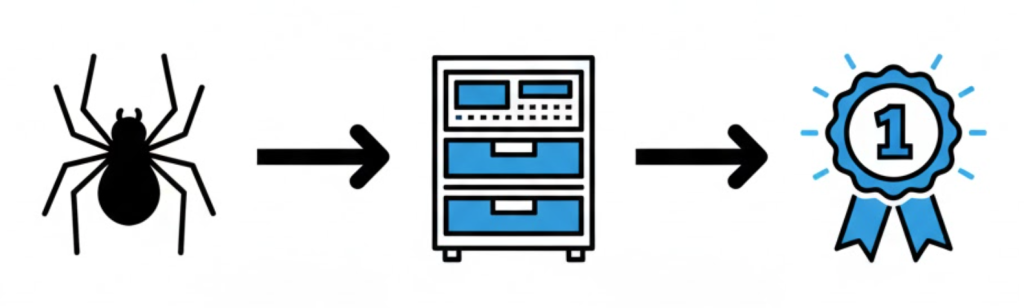
The 3-Step Process: Crawl, Index, Rank
To understand indexing, you have to understand the full process.
Step 1: Crawling (Discovery)
Google has to *find* your page. It uses robots (“spiders”) that follow links from one page to another to discover new URLs.
Step 2: Indexing (Filing)
Just because Google *finds* your page doesn’t mean it will *keep* it. It analyzes the code to determine if it is high-quality or spam. If it passes, it gets added to the Index.
Step 3: Ranking (Serving)
When a user searches, Google pulls pages from the Index and ranks them. You cannot Rank if you are not Indexed.
“Why Isn’t My Page Indexed?” (The 4 Reasons)
This is the question we get all the time. It’s usually one of these reasons:
1. You Are Blocking Google (Technical Error)
You might have a “noindex” tag in your code or a rule in your “robots.txt” file that literally tells Google: “Do not look at this page.”
2. Google Chooses Not to Index It (Quality Problem)
This is the most common. Google crawled it but decided it was “Thin Content” or low value. In Search Console, this shows as “Crawled – currently not indexed.”
3. Duplicate Content
Google found three versions of the same page and got confused, so it indexed none of them.
4. Orphan Pages
The page has no internal links pointing to it, so the crawler couldn’t find it.
Technical Insight: “Crawl Budget”
Google doesn’t have infinite resources. It assigns a Crawl Budget to every website—a limit on how many pages it will crawl per day.
If your site is full of “junk” (thousands of low-quality filter pages or 404 errors), Google wastes its budget on the trash and runs out of time before it reaches your good content. Optimizing your Indexing is really about managing your Crawl Budget efficiently.
How to Check if Your Page is Indexed
Method 1: The “site:” Search
Go to Google and type: site:yourdomain.com/your-page-url. If nothing shows up, it’s not indexed.
Method 2: Google Search Console (Professional)
Use the “URL Inspection” tool in Google Search Console. It gives you a direct report: “URL is on Google” (Good) or “URL is not on Google” (Bad).
The Takeaway
Getting your site indexed is an active process of technical health management.
At Saint Digital, our SEO services act as the “librarians” who ensure your site is a perfectly organised library that Google loves to recommend.
Don’t just get visitors. Get customers.
A beautiful website is nice, but a beautiful website that converts is a business-changer. We at Saint Digital obsess over the psychology of the click. We design every button and every link to guide your user to their “next step.”
Ready to turn your website clicks into clients? Let’s have a chat.
Learn more from our Glossary
© Saint Digital Ltd, 2020-26, all rights reserved.