
Accessibility (WCAG)

What is Web Accessibility (WCAG)? (Why Good Design Leaves No One Behind)
Imagine you build a physical shop. You spend thousands on the interior. But you put a 10-inch step at the front door.
You have just blocked 20% of the population—people in wheelchairs, parents with pushchairs, or delivery drivers with trolleys—from entering. You haven’t just been rude; you have lost money.
On the web, this happens every day. We build beautiful sites that are unusable for people with visual, motor, or cognitive impairments.
This is where Web Accessibility comes in.
Welcome to the decoder ring. Web Accessibility is the practice of designing websites so that people with disabilities can perceive, understand, navigate, and interact with them. It is governed by a global standard called WCAG (Web Content Accessibility Guidelines).
At Saint Digital, we believe accessibility isn’t a “nice to have.” It is the baseline. An accessible site is a better site for everyone—including Google.
Accessibility and SEO go hand-in-hand.
The technical updates that make your site friendly for screen readers—like semantic code and alt tags—are the exact same signals Google uses to understand your content. Learn how to build a clean technical foundation in our guide.
The “Curb Cut” Effect: Why This Matters for You
You might think, “My target audience isn’t disabled, so I don’t need this.” You are wrong.
First, 15% of the global population lives with some form of disability. Second, accessibility features help everyone. This is known as the Curb Cut Effect. When cities lowered curbs for wheelchair users, they found that everyone else loved them too.
- High contrast text helps people with poor vision, but it also helps anyone looking at their phone in bright sunlight.
- Captions help the deaf, but they also help people watching video on the bus with the sound off.
What is WCAG? (The Global Standard)
WCAG (Web Content Accessibility Guidelines) is the rulebook. It has three levels of compliance:
- Level A (Must Have): The bare minimum. If you fail this, your site is broken for many users.
- Level AA (Should Have): The global standard. This is what most laws (like the ADA or Equality Act) expect businesses to meet. We build to this level.
- Level AAA (Ideal): The gold standard. Very strict and difficult to achieve for complex sites.
The 4 Principles of Accessibility (POUR)
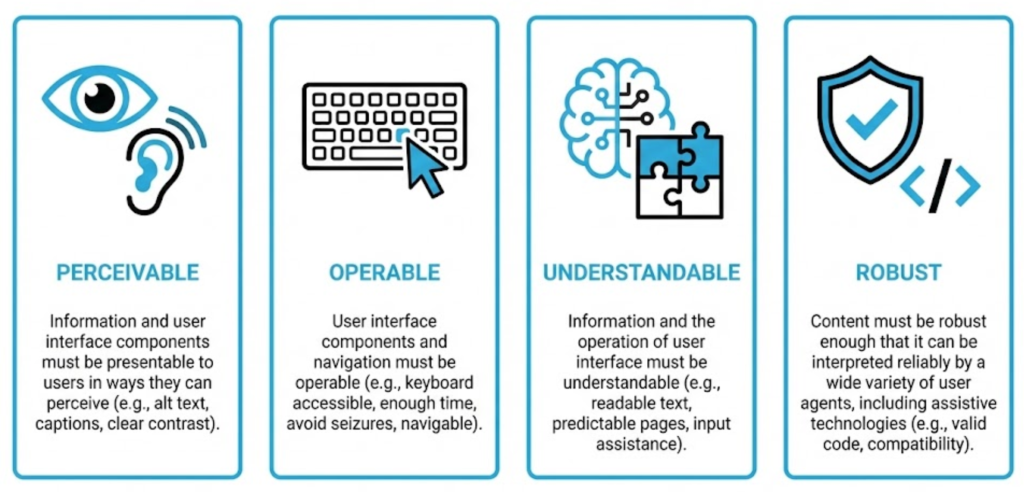
To understand how to fix your site, you need to understand the four pillars of WCAG. They form the acronym POUR.
1. Perceivable
Information must be presented in a way users can perceive (see or hear). Do all images have Alt Text? Is there enough contrast?
2. Operable
Users must be able to operate the interface. Can you navigate the entire site using only the Keyboard (Tab key)? Do you avoid flashing content?
3. Understandable
Users must be able to understand the operation. Is the language clear? Do error messages explain how to fix the problem?
4. Robust
Content must be robust enough to be interpreted by assistive technologies. Is the HTML code clean and error-free?
The SEO Connection: Why Google Loves Accessibility
Here is the secret: Googlebot is a blind user.
Googlebot scans your site exactly like a Screen Reader does. It relies on code structure, text labels, and clear navigation to understand what is going on.
- Alt Text: Helps blind users AND helps you rank in Google Images.
- Heading Tags (H1, H2): Help screen readers navigate AND help Google understand content hierarchy.
- Link Text: Descriptive links help blind users AND pass better keyword signals to Google.
Technical Insight: ARIA Labels
Sometimes, visual design doesn’t translate to code. A “Hamburger Menu” icon just looks like three lines. A screen reader doesn’t know it’s a menu.
To fix this, we use ARIA (Accessible Rich Internet Applications) Labels. We add a hidden code tag: aria-label="Open Menu". This tells the screen reader exactly what the button does, without changing the visual design.
Common Accessibility Fails (And How to Fix Them)
1. The “Click Here” Trap
Screen reader users often scan a list of links. Hearing “Click Here, Click Here” tells them nothing.
Fix: Write descriptive links. “Read our SEO Guide.”
2. The “Invisible” Focus State
When you use the Tab key, there should be a blue outline around the box you are typing in. Designers often remove this.
Fix: Never remove the CSS outline property. It allows keyboard users to see where they are.
3. Text in Images
Putting your headline inside a JPG image means a blind user (and Google) cannot read it.
Fix: Use real text overlaying the image.
The Takeaway
Web Accessibility isn’t a constraint; it is a quality standard.
It ensures your digital storefront is open to everyone. It protects you from legal risk, improves your SEO, and demonstrates that your brand values inclusivity.
At Saint Digital, our web design services build Level AA compliant websites by default. We test with automated tools and manual checks to ensure your site works for every single visitor who lands on it.
Is your website blocking customers? Let’s open the door.
Design for everyone.
If your website isn’t accessible, you are turning away 15% of your customers. We at Saint Digital build inclusive, WCAG-compliant websites. We ensure your design is beautiful, functional, and open to everyone, regardless of how they browse.
Let’s build without barriers.
Learn more from our Glossary
© Saint Digital Ltd, 2020-26, all rights reserved.