
Pagespeed

What is Page Speed? (And Why Slow Sites Lose Money)
We live in the age of instant gratification. If you press a button and nothing happens for three seconds, you get frustrated. You assume it’s broken. You leave.
This simple human behavior makes Page Speed the single most critical technical metric for your website’s success.
You can have the most beautiful design in the world. You can have Pulitzer-prize winning copy. But if your user has bounced before the page even loads, none of that matters.
Welcome to the decoder ring. Page Speed isn’t just a technical detail for developers to worry about. It is a Revenue Metric. It is a confirmed Google Ranking Factor. And it is the first line of defense against a high Bounce Rate.
At Saint Digital, we don’t treat speed as an afterthought. We treat it as a core feature. We build high-performance websites because we know that on the internet, speed equals trust.
Is your site bleeding revenue?
Every second of delay costs you conversions. Discover how to audit your performance, identify bottlenecks, and supercharge your site’s speed in our complete technical guide.
The “3-Second Rule”: Why Speed Matters
Why are we so obsessed with milliseconds? Because the data is terrifying.
Google has released extensive data on how mobile page speed affects user behavior. The results are undeniable:
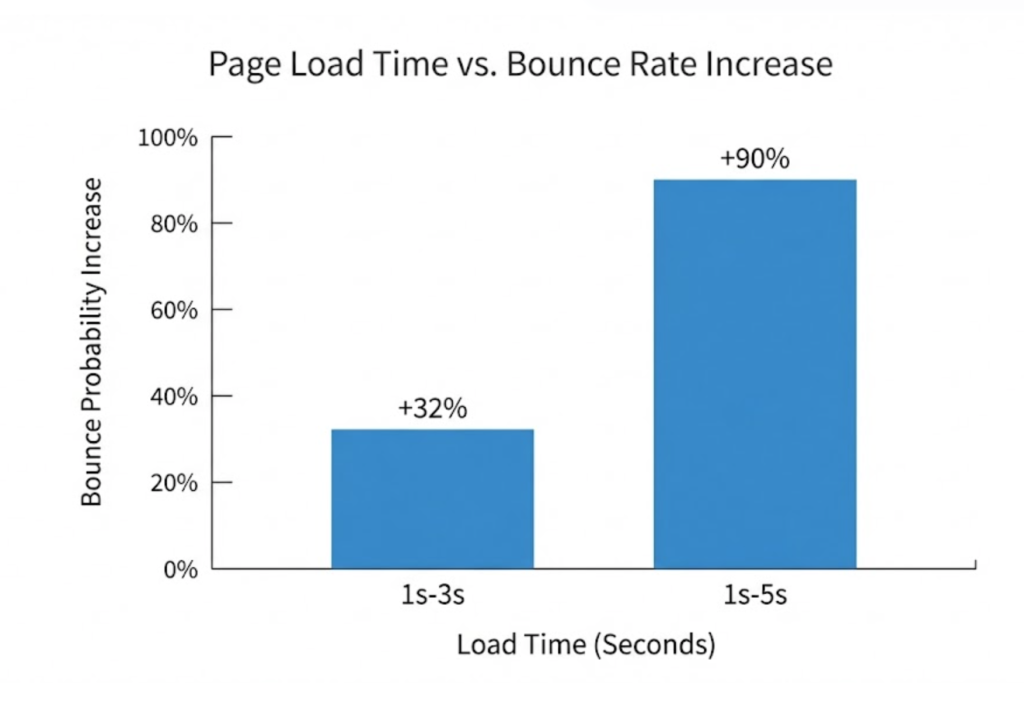
- As page load time goes from 1 second to 3 seconds, the probability of a bounce increases by 32%.
- As page load time goes from 1 second to 5 seconds, the probability of a bounce increases by 90%.
Think about that. If your site takes 5 seconds to load (which is common for cheap, unoptimised sites), you are losing nearly double the amount of potential customers before they even see your logo.
This directly impacts your wallet. Amazon found that every 100ms of latency (that’s just 0.1 seconds) cost them 1% in sales. Walmart found that for every 1 second of improvement in page speed, they increased conversions by 2%.
How Google Measures Speed (Core Web Vitals)
Google doesn’t just use a stopwatch. You can’t just say “My site loads in 2 seconds.” That doesn’t mean anything. It depends on the device, the connection, and location.
Instead, Google uses a sophisticated set of user-centric metrics called Core Web Vitals. We have a full guide on this, but here is the summary for Page Speed:
1. LCP (Largest Contentful Paint)
This is the most important one. It measures perceived load speed. It asks: “How long until the biggest thing on the screen (usually the main image or headline) is visible?”
The Goal: Under 2.5 seconds.
2. TTFB (Time to First Byte)
This measures your Server/Hosting speed. It asks: “How long between the user clicking the link and the server sending back the very first byte of data?”
If your TTFB is slow, your entire site is slow. This is why cheap, shared hosting is a false economy.
3. FCP (First Contentful Paint)
This asks: “How long until the user sees anything different from a white screen?” Even if it’s just a background colour or a menu bar, seeing something reassures the user that the site is working and reduces impatience.
Technical Deep Dive: The Critical Rendering Path
Before a browser can show your page, it has to follow a recipe called the Critical Rendering Path.
It downloads HTML -> Downloads CSS -> Downloads JS -> Builds the Page.
If you have a huge CSS file at the top of your code that isn’t needed right away, the browser pauses everything else until that file is downloaded and read. This is called a “Render-Blocking Resource.” Our job is to find these bottlenecks and defer them so the browser can paint the content immediately.
The 5 Main Culprits of a Slow Website
We audit hundreds of websites. When a site is slow, it is almost always due to a combination of these five “speed killers.”
1. Uncompressed Images (The #1 Killer)
This is the most common issue. A client uploads a photo directly from their professional camera. It’s a 5MB file. On a mobile connection, a 5MB file takes forever to download.
The Fix: We use automated tools to compress images and convert them to “Next-Gen” formats like WebP, which look identical but are 10x smaller.
2. Code Bloat (Too Many Plugins)
WordPress is great, but “plugin addiction” is fatal. Every plugin you add (calendar, chat bot, social feed, slider) adds extra CSS and JavaScript code that the browser has to read, even on pages where the plugin isn’t used.
The Fix: We strip out unnecessary plugins and use code minification.
3. Third-Party Scripts
Do you have a Facebook Pixel, Google Analytics, a Hotjar tracker, and a live chat widget on your site? Each one of these requires your site to connect to an external server, which takes time.
The Fix: We delay the loading of these scripts so they don’t block the main content from appearing.
4. Cheap Hosting
You get what you pay for. Cheap “shared” hosting (where you pay £5/month) means you are sharing a single server with 500 other websites. If one of them gets busy, your site slows down to a crawl.
The Fix: We recommend high-performance, dedicated cloud hosting. It’s like having your own private lane on the motorway.
5. Lack of Caching & CDN
Every time a user visits your page, your server has to “build” it from scratch (find the logo, find the text, put them together). This takes time.
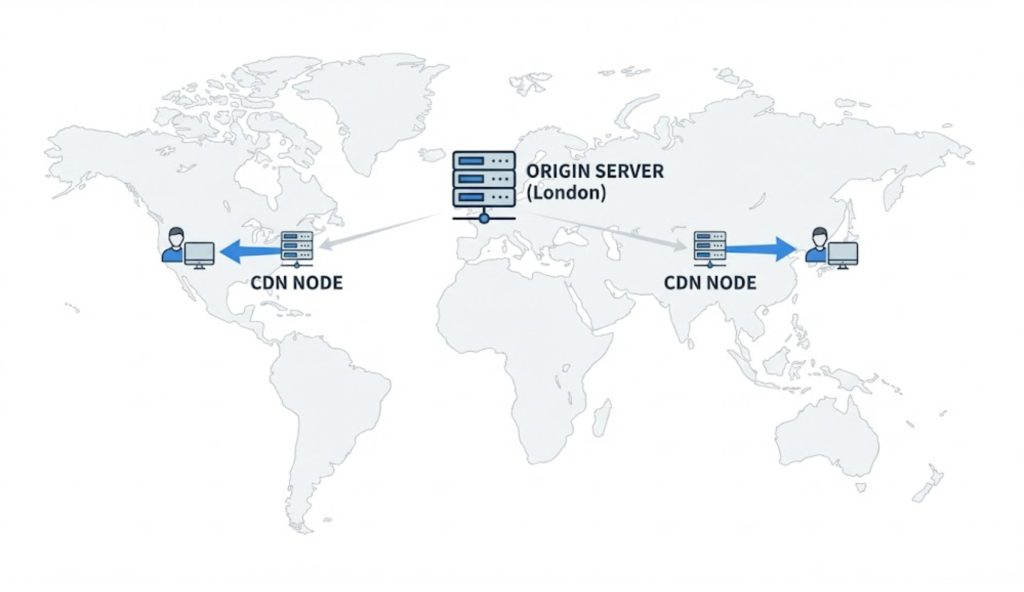
The Fix: Caching creates a “photocopy” of the finished page. When the next user visits, the server instantly hands them the photocopy. We also use a CDN (Content Delivery Network) like Cloudflare to serve your site from servers geographically close to the user.
Lab Data vs. Field Data
When you test your site on Google PageSpeed Insights, you see two sets of data.
- Lab Data (Simulated): This is a test run by a single Google server under controlled conditions. It’s useful for debugging but doesn’t reflect reality.
- Field Data (Real Users): This is the “source of truth.” It is collected from real-world Chrome users visiting your site. If your users have old phones and slow connections, your Field Data will be worse than your Lab Data. Google uses Field Data for ranking.
Mobile Speed vs. Desktop Speed
This is a critical distinction. Due to Mobile-First Indexing, Google predominantly looks at your Mobile speed score.
You might check your site on your office fibre WiFi on a Macbook Pro and think “It’s fast!” But Google is testing it on a simulated mid-range Android phone on a 4G mobile connection. If your site relies on huge videos or heavy code that chokes a mobile processor, you will get a “Red” score from Google, even if it feels fast on your laptop.
The Takeaway
Page Speed is the foundation of digital performance. It is a continuous battle, not a one-time fix.
A fast site ranks higher. A fast site keeps users happy. A fast site makes more money.
At Saint Digital, our web design services bake performance into the process. We don’t just design for “pretty”; we design for “instant.”
Is your site slowing your business down? Let’s check under the bonnet.
Don’t let speed kill your sales.
Every second of delay costs you money. If your site is sluggish, users are bouncing to your competitors. We at Saint Digital build high-performance websites that load instantly. We optimize code, images, and servers to ensure your site is fast, stable, and ready to rank.
Let’s speed things up.
Learn more from our Glossary
© Saint Digital Ltd, 2020-26, all rights reserved.