
XML Sitemap

What is an XML Sitemap? (The Roadmap Google Uses to Find Your Content)
Imagine you are trying to navigate a massive, unfamiliar city. You could drive around randomly, hoping to stumble upon the right address. Or, you could just use a GPS.
Googlebot is the driver. Your website is the city.
And your XML Sitemap is the GPS.
An XML Sitemap is a specifically formatted file that lists every single important page on your website. It sits on your server, quietly waiting for search engines to read it. It doesn’t make your site look different to humans. But for robots, it is the difference between wandering blindly and having a direct route to your content.
At Saint Digital, we treat the XML Sitemap as the “source of truth.” It is the first thing we check in an audit because if your roadmap is wrong, Google is guaranteed to get lost.
Is Google getting lost on your site?
A broken sitemap prevents new content from being indexed. Learn how to configure your sitemaps, robots.txt, and crawl budget in our technical guide.
XML vs. HTML Sitemaps (The Difference)
This is the most common confusion. “I already have a sitemap in my footer!” you might say. That is likely an HTML Sitemap. There are two types:
1. The HTML Sitemap (For Humans)
This is a standard webpage (usually linked in the footer) that lists your pages as clickable links. It is designed for human users to find their way around if the main menu fails them. It is a Navigation tool.
2. The XML Sitemap (For Robots)
This is a code file (Extensible Markup Language). It is not meant to be read by humans. It is designed exclusively for search engine crawlers. It contains data that humans don’t care about, like when the page was last updated.
What Does an XML Sitemap Look Like?
You can usually see yours by typing yourdomain.com/sitemap.xml or /sitemap_index.xml.
It looks like a list of code blocks. Each block represents a URL and contains three key pieces of information:
- <loc>: The location (URL) of the page.
- <lastmod>: The date the page was last modified.
- <images>: Information about images on the page (helping them rank in Google Images).
Why is an XML Sitemap Vital for SEO?
Technically, Google can find your pages without a sitemap, just by following internal links. However, relying on that is risky.
- It Speeds Up Discovery: With a sitemap, the moment you hit publish, the sitemap updates. Google sees the new URL immediately.
- It Helps “Orphan” Pages: The XML Sitemap ensures “hidden” pages (like PPC landing pages) get indexed even if they aren’t in the menu.
- It Signals “Freshness”: The
<lastmod>date tells Google: “Hey! This page changed yesterday. Come and re-crawl it!”
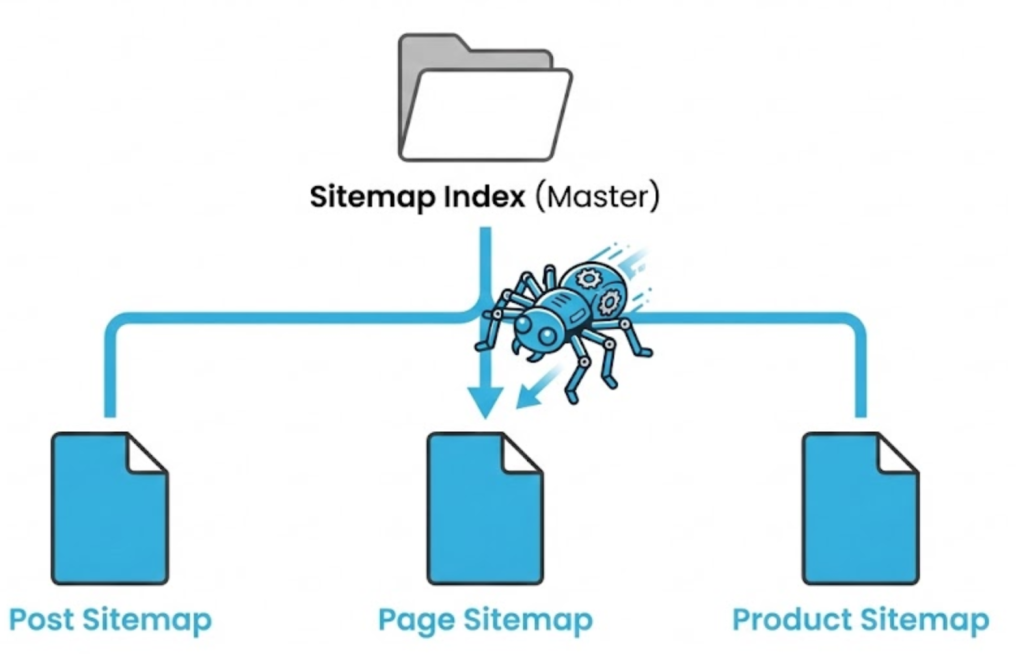
Technical Limits: The Sitemap Index
Did you know a single sitemap file has a limit?
It can only hold 50,000 URLs or be 50MB in size. If you have a massive e-commerce store with 100,000 products, you can’t put them all in one file.
You need a Sitemap Index. This is a “Master Map” that links to smaller maps (e.g., sitemap-products-1.xml, sitemap-products-2.xml). It acts like a folder, organizing your content neatly for Google.
The Golden Rule: Keep It Clean
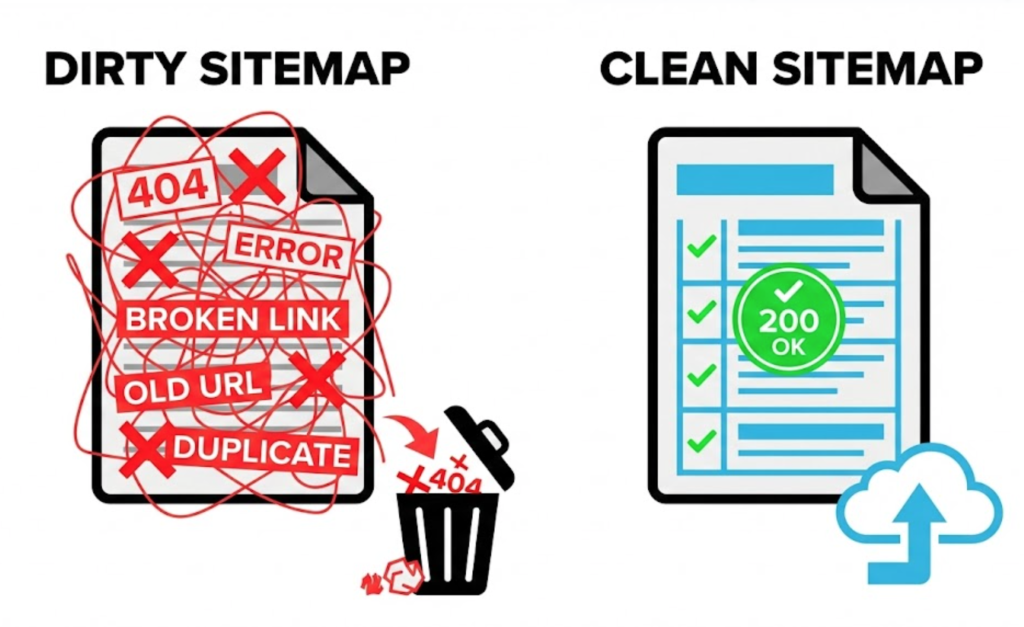
This is where 90% of websites fail. Having a sitemap is good. Having a “dirty” sitemap is dangerous.
Your sitemap should ONLY contain pages you want to rank on Google (Status Code 200 OK). It should NEVER contain:
- 404 Errors: Why send Google to a dead page? It wastes Crawl Budget.
- 301 Redirects: Don’t send Google to the old URL just to be forwarded. Send them straight to the new URL.
- Noindex Pages: If you told Google not to index a page, do not put it in the sitemap. You are sending mixed signals.
- Duplicate URLs: Only include the Canonical version of a page.
Dynamic vs. Static Sitemaps
In the old days, you had to manually create a sitemap file and upload it via FTP. Today, we use Dynamic Sitemaps.
If you use WordPress (with plugins like Yoast or RankMath) or Shopify, your sitemap is generated automatically. When you publish a post, the sitemap updates instantly. However, we must configure these settings to ensure junk pages (like “Author Archives”) aren’t submitted by accident.
How to Submit Your Sitemap to Google
Just having the file isn’t enough. You have to hand the map to the driver.
We do this using Google Search Console.
- Log in to GSC.
- Click “Sitemaps” in the left menu.
- Enter your sitemap URL (e.g.,
sitemap_index.xml). - Click “Submit.”
The Takeaway
The XML Sitemap is the foundation of your technical communication with Google. It says: “Here are my pages. Here is when they changed. Please rank them.”
If that communication is messy, broken, or outdated, your SEO suffers. If it is clean, precise, and automated, you give your content the best possible chance of being found fast.
At Saint Digital, our SEO services ensure your technical roadmap is flawless so Google never hits a dead end.
Is your roadmap up to date? Let’s check.
Is Google getting lost?
If your sitemap is full of errors, you are sending Google on a wild goose chase. We at Saint Digital build clean, dynamic, and error-free sitemaps. We ensure your roadmap is accurate so your new content gets indexed faster.
Let’s guide Google to your site.
Learn more from our Glossary
© Saint Digital Ltd, 2020-26, all rights reserved.