
Sitelinks
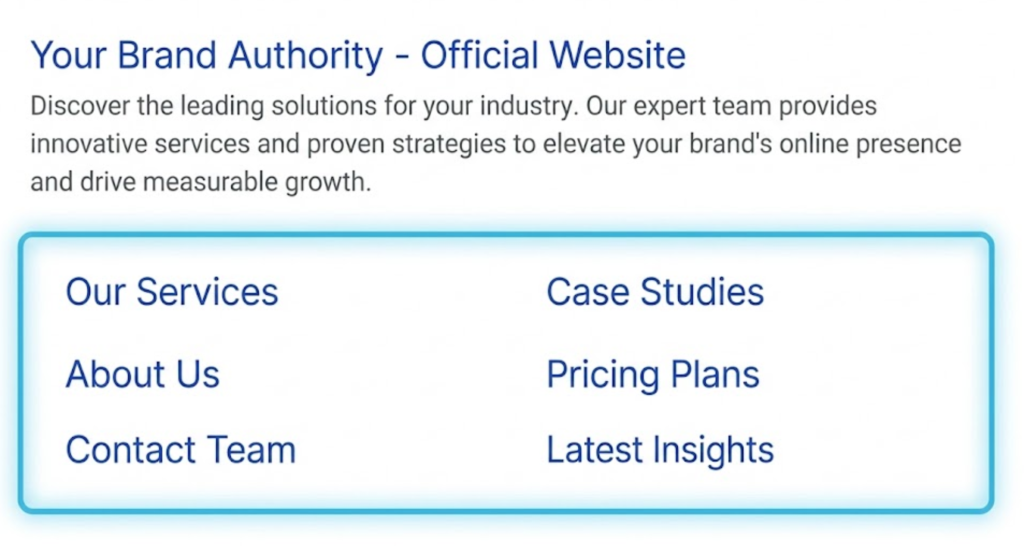
What are Sitelinks? (How to Take Up More Space on Google)
Have you ever Googled a brand name, and instead of a single blue link, you saw a massive block of 4 or 6 links underneath it?
They link to “About Us,” “Services,” “Contact,” or popular product categories. This expanded result pushes all your competitors down the page. It makes you look like a market leader.
These are Sitelinks.
Welcome to the decoder ring. Sitelinks are additional links that appear under the main search result for a domain. They are designed to help users navigate your site faster, skipping the homepage to get directly to the content they want.
At Saint Digital, we love Sitelinks. Why? Because they increase your CTR (Click-Through Rate) by up to 20% and allow you to dominate the “Above the Fold” real estate on Google.
Are you wasting valuable screen space?
A poor site structure prevents Google from awarding Sitelinks. Learn how to architect your site for maximum visibility and crawlability in our complete technical guide.
Why Sitelinks Are an SEO Superpower
Sitelinks aren’t just convenient navigation shortcuts; they are a competitive weapon.
1. SERP Domination (Pixel Real Estate)
A normal search result takes up about 100 pixels of vertical height. A result with a full pack of Sitelinks can take up to 400-500 pixels.
By physically occupying more space, you push your competitors below the fold. On a mobile device, a brand with Sitelinks can take up the entire screen, forcing the user to scroll just to see anyone else. This is a massive branding win.
2. Improved Click-Through Rate (CTR)
Sitelinks give users more reasons to click. If a user isn’t interested in your “Homepage,” they might be interested in your “Pricing” or “Blog.” Offering multiple entry points increases the statistical probability of winning the visitor.
3. Trust & Authority
Google doesn’t give Sitelinks to everyone. It only awards them to sites it trusts and understands. Seeing Sitelinks tells the user: “This is a legitimate, authoritative brand.”

The Two Types of Sitelinks
Not all Sitelinks look the same.
- The Six-Pack: This is the “Holy Grail.” It appears for branded searches (e.g., searching “Saint Digital”). It shows two columns of links with short descriptions.
- One-Line Sitelinks: These appear for non-branded queries. They are a single row of small text links (up to 4) under the main description. While less dominant, they still help CTR.
How to Get Sitelinks (The “Secret”)
Here is the frustrating part: You cannot “turn on” Sitelinks.
There is no button in Google Search Console to enable them. Google’s algorithm generates them automatically if it thinks they are useful. However, you can influence the algorithm. Here is the Saint Digital strategy for earning them.
1. Brand Uniqueness
You are most likely to get Sitelinks for your Brand Name search. If your brand name is generic (e.g., “Best Plumber”), Google won’t know if the user wants you or just a plumber. If your brand name is unique (e.g., “Saint Digital”), Google knows the user is looking for you specifically.
2. Crystal Clear Site Architecture
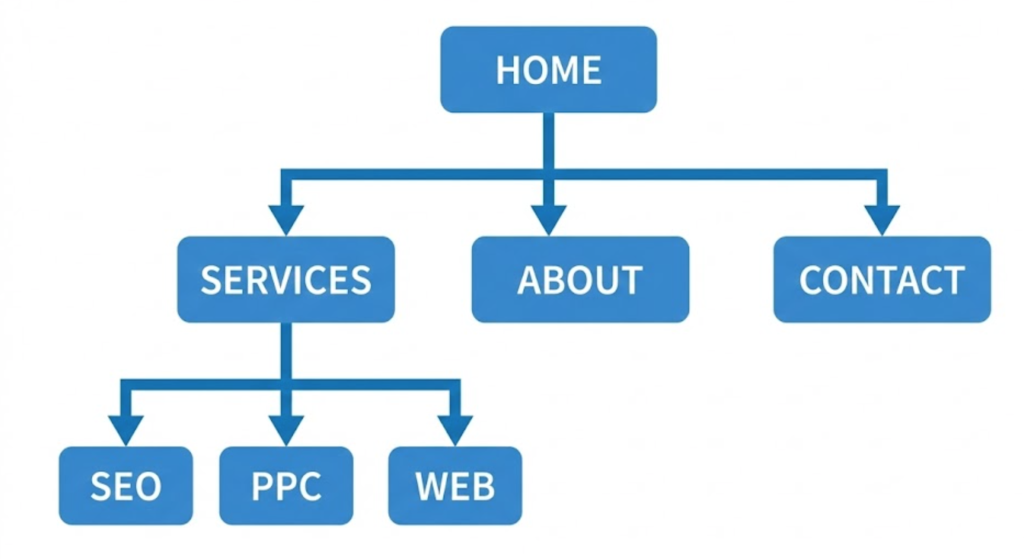
Google needs to understand your hierarchy.
- Bad: A flat site where every page is linked from the homepage.
- Good: A pyramid structure. Home > Services > Web Design.
If your “Services” page links to 5 sub-services, and your “About” page links to “Team” and “Careers,” Google understands that “Services” and “About” are parent categories worth featuring.
3. Logical Internal Linking
We have discussed this in our Internal Links guide. If you want your “Contact” page to be a Sitelink, you must link to it from your main menu and footer. The more internal links a page has, the more important it looks to Google.
4. Descriptive Page Titles
Your Title Tags and H1s must be clear. Google pulls the Sitelink text directly from these.
- Bad Title: “What we do and how we help” (Too long, vague).
- Good Title: “Services” (Short, clear).
The “Search Box” Sitelink
Sometimes, you see a search bar inside the Sitelinks block. This allows users to search your website directly from Google’s results page.
This is powered by Structured Data. We implement WebSite Schema markup (JSON-LD) on your homepage. This code explicitly tells Google: “Here is my internal search engine URL.” While not guaranteed, this markup dramatically increases your chances of getting the Sitelink Search Box.
How to Remove a Bad Sitelink
Sometimes, Google picks a weird page. Maybe it decides your “Privacy Policy” is your most important page and puts it right under your homepage link. It looks unprofessional.
In the past, you could “demote” Sitelinks in Search Console. Google removed this tool in 2016. Today, the only way to remove a bad Sitelink is to de-optimise it.
- Remove it from the main menu: If it’s not in the navigation, it looks less important.
- Use a “Noindex” tag: If you really don’t want it in search results at all, hide it.
- Change the Title: If the link text is confusing, rename the page title to something clearer.
The Takeaway
Sitelinks are a reward for good behaviour.
They are Google’s way of saying: “This site is well-structured, trustworthy, and popular.”
You cannot buy them, but you can build for them. By creating a logical site structure, using clear navigation, and building a strong brand, you make it easy for Google to give you the “VIP Treatment” in the search results.
At Saint Digital, we build site architectures designed to win Sitelinks. We structure your data so Google understands exactly which pages are the stars of the show.
Do you want to take up more space?
Dominate the Results Page.
Why settle for one link when you can have six? We at Saint Digital are technical SEO architects. We build the logical site structures and internal linking strategies that encourage Google to award you valuable Sitelinks.
Let’s expand your footprint.
Learn more from our Glossary
© Saint Digital Ltd, 2020-26, all rights reserved.