
Pagination
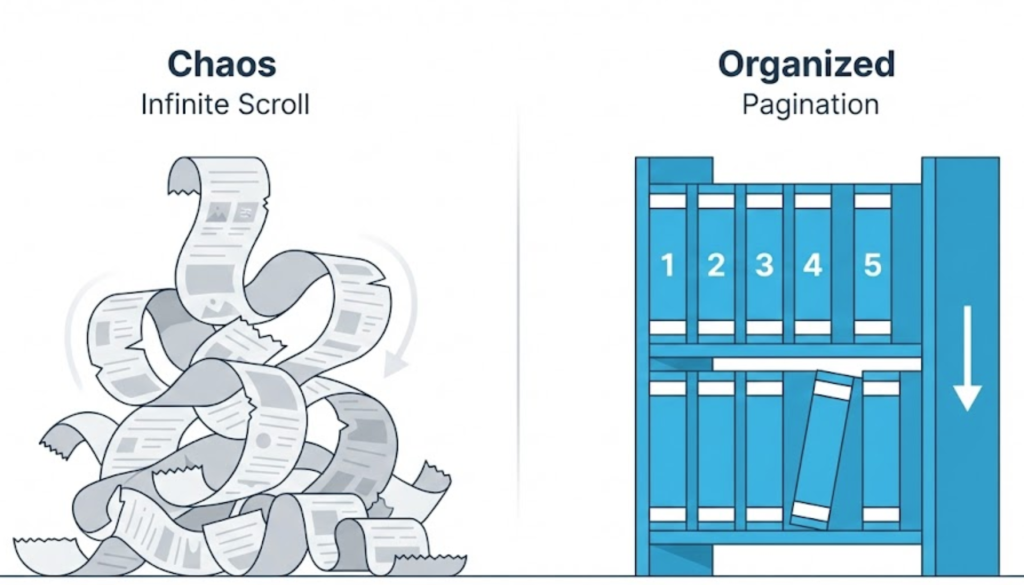
What is Pagination? (And Why “Infinite Scroll” Isn’t Always Better)
You have an online store with 5,000 products. Or a corporate blog with 500 articles. You cannot show them all on one single URL. If you did, the page would be 10 miles long, the user would be scrolling forever, and the browser would crash trying to load 5,000 images at once.
So, you split the content up. You create “Page 1,” “Page 2,” “Page 3.”
This is Pagination.
Welcome to the decoder ring. Pagination is the process of dividing a large set of content into discrete, manageable pages. It seems simple—just a row of numbers at the bottom of the screen—but getting it wrong is one of the most common technical SEO disasters we see.
At Saint Digital, we treat pagination as a critical part of site architecture. If your pagination is broken, Google can’t find your older products, your authority gets diluted, and your deep content becomes invisible.
Are your products hiding from Google?
Broken pagination makes deep content invisible to search engines. Learn how to audit your site’s structure and ensure every page is crawlable in our technical guide.
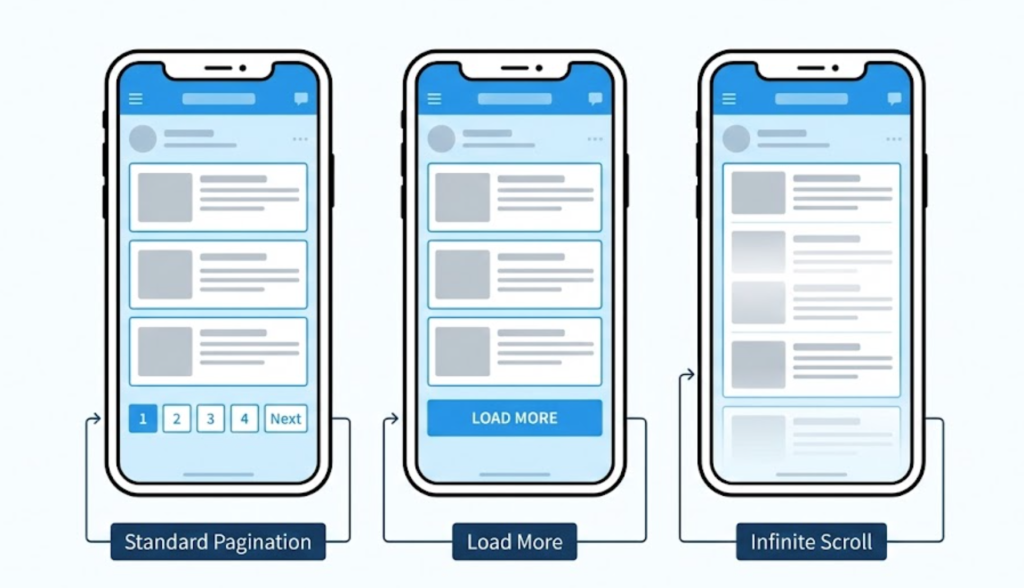
The 3 Types of Pagination (And When to Use Them)
Before we talk SEO, let’s look at the User Experience (UX) options. Not all pagination is created equal.
1. Standard Pagination (1, 2, 3… Next)
This is the classic row of numbered links at the bottom of the page.
- Pros: Excellent for SEO. Googlebot can clearly see and follow the links. Users know exactly where they are (“I am on Page 3 of 10”). It allows users to “skip” to the end.
- Cons: Can feel a bit “old school” compared to modern apps.
- Best For: E-commerce category pages and search results.
2. Infinite Scroll
This is what social media uses (Facebook, Instagram). As you scroll down, new content magically loads. There is no “Next” button.
- Pros: Very addictive. It keeps users browsing effortlessly (“doom scrolling”).
- Cons: A nightmare for SEO. Googlebot doesn’t “scroll.” It often cannot see the content that loads dynamically. It only sees the first 10 items. Also, if your footer is at the bottom, users can never click it because the page keeps growing!
- Best For: Social feeds or entertainment sites.
3. The “Load More” Button
A hybrid approach. You show 20 items, then a button says “Load More.”
- Pros: Better than infinite scroll because the user is in control. It doesn’t break the footer.
- Cons: Still requires JavaScript to work, which can be tricky for bots to index properly.
How to Optimise Pagination for SEO
We use a strict technical checklist to ensure pagination helps, rather than hurts, your rankings.
1. Use Self-Referencing Canonicals
In the past, some SEOs pointed the Canonical Tag of Page 2, 3, and 4 back to Page 1. Do not do this.
If you tell Google that Page 2 is just a “copy” of Page 1, Google will de-index Page 2. That means all the unique products on Page 2 become invisible to the search engine. The Fix: Page 2 should canonicalise to Page 2. Page 3 to Page 3. Treat each page as a unique, valuable asset.
2. Unique Metadata
Don’t let every page have the exact same Title Tag. This causes “Duplicate Title” errors in Search Console.
- Page 1 Title: “Mens Running Shoes | Saint Digital”
- Page 2 Title: “Mens Running Shoes – Page 2 | Saint Digital”
3. Don’t “Noindex” Paginated Pages
Some people put a “Noindex” tag on Page 2+ to save Crawl Budget. This is dangerous.
If Google stops indexing Page 2, it stops following the links on Page 2. Eventually, the products listed on Page 2, 3, and 4 become Orphans because the spider stops crawling the chain.
The “View All” Strategy
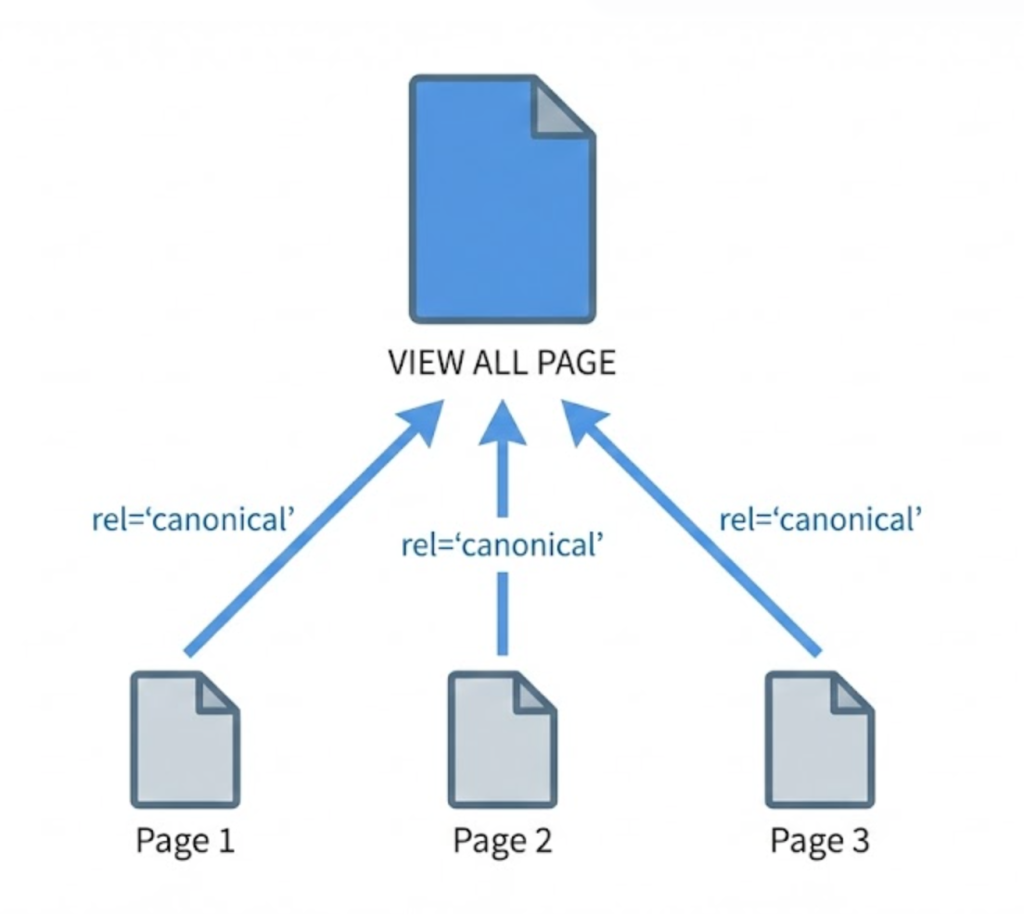
If you have a manageable number of products (e.g., 50-100), consider creating a “View All” page that lists everything on one URL.
This is often the best page to rank because it has the most content and keyword density. You can then canonicalise the paginated series (1, 2, 3) to the “View All” version. This tells Google: “Scan the ‘View All’ page for ranking, but keep the pagination for users.”
Technical Note: The Death of rel=”prev/next”
For years, Google recommended using special HTML tags called rel="next" and rel="prev" in the code to indicate pagination series. As of 2019, Google officially announced they no longer use these tags.
You can leave them in for other search engines (like Bing), but for Google, they are ignored. You must rely on clear internal linking and canonical tags instead.
Smart Pagination: Solving “Click Depth”
If you have 100 pages of products, standard pagination looks like this:[1] [2] [3] ... [Next]
The problem? To get to Page 50, Googlebot has to click “Next” 50 times. That is a massive Click Depth. Google might give up before it reaches the end.
The Fix: Use “Smart Pagination” that includes links to the middle and end of the series:[1] [2] [3] ... [50] ... [99] [100]
This drastically reduces the number of clicks required to reach deep content, flattening your site architecture.
The “Infinite Scroll” Fix (for Google)
If you absolutely must use Infinite Scroll for UX reasons, you have to build it correctly for Google.
You must implement History API (pushState). This means that as the user scrolls and new content loads, the URL in the browser bar automatically updates from /shoes to /shoes?page=2.
This allows users to bookmark their spot, and crucially, it allows Googlebot to find specific, direct links to the deep content.
The Takeaway
Pagination isn’t just a navigation feature; it is the skeleton of your e-commerce site.
If your pagination is broken, your deep content is invisible. You are hiding your own inventory from the customers looking for it.
At Saint Digital, our web design services balance UX with technical reality. We build pagination systems that feel modern and smooth for users, but remain crystal clear and crawlable for Google bots.
Are your products hiding on Page 2? Let’s fix that.
Is your best content hidden?
If Google can’t get past Page 1, it can’t rank your products. We at Saint Digital build SEO-friendly architectures. We ensure your pagination allows crawlers to reach every single item in your inventory, maximizing your visibility.
Let’s unlock your archive.
Learn more from our Glossary
© Saint Digital Ltd, 2020-26, all rights reserved.