
Javascript SEO
What is JavaScript SEO? (The Reason Google Can’t Read Your Website)
Here is a nightmare scenario for modern developers. You build a sleek, lightning-fast website using a modern framework like React, Angular, or Vue. It looks incredible to you. It works perfectly for your customers.
But when you check your rankings, you are nowhere to be found.
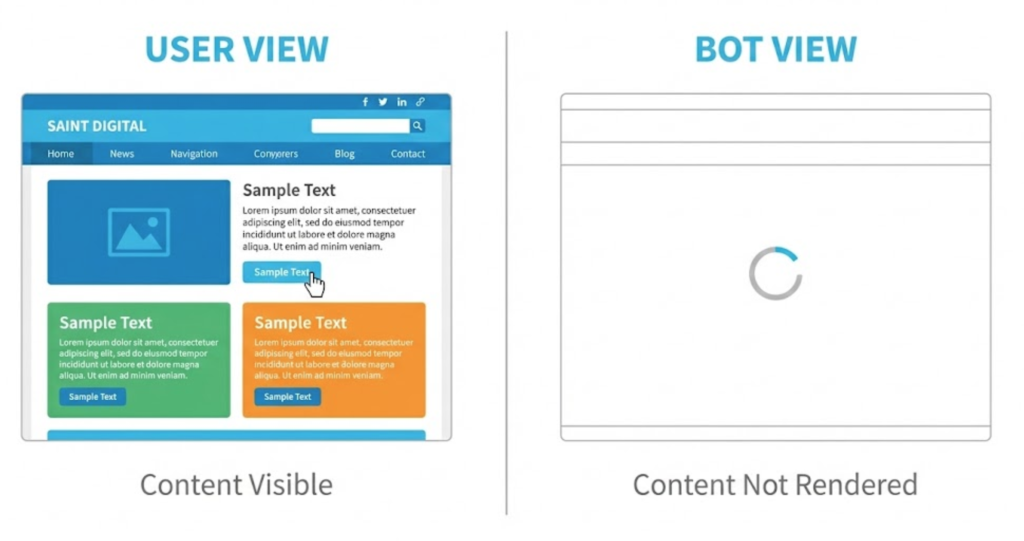
Why? Because while you see a beautiful website, Google might just be seeing a blank white screen.
Welcome to the decoder ring. JavaScript SEO is the technical discipline of ensuring that search engines can crawl, render, and index websites that rely heavily on JavaScript.
At Saint Digital, we see this constantly with SaaS platforms and modern web apps. The code is brilliant, but it is invisible to the one visitor that matters most: Googlebot.
Is your code hiding your content?
Modern frameworks require a different SEO approach. Learn how to ensure search engines can read your application in our detailed Technical SEO guide.
The Core Problem: Client-Side Rendering (CSR)
To understand JavaScript SEO, you have to understand how a browser loads a page.
In the old days, the server did the work. It sent a fully finished HTML page to the browser. Google loves this. It reads the HTML, finds the keywords, and ranks you.
Modern sites often use Client-Side Rendering (CSR). The server sends a tiny, empty shell of HTML and a massive bundle of JavaScript files. The browser (the client) then runs that code to build the page.
The problem? If Googlebot crawls the page before the JavaScript finishes running, it sees an empty shell. It sees <div id="app"></div> instead of your 2,000-word article.
The “Two-Wave” Indexing Process
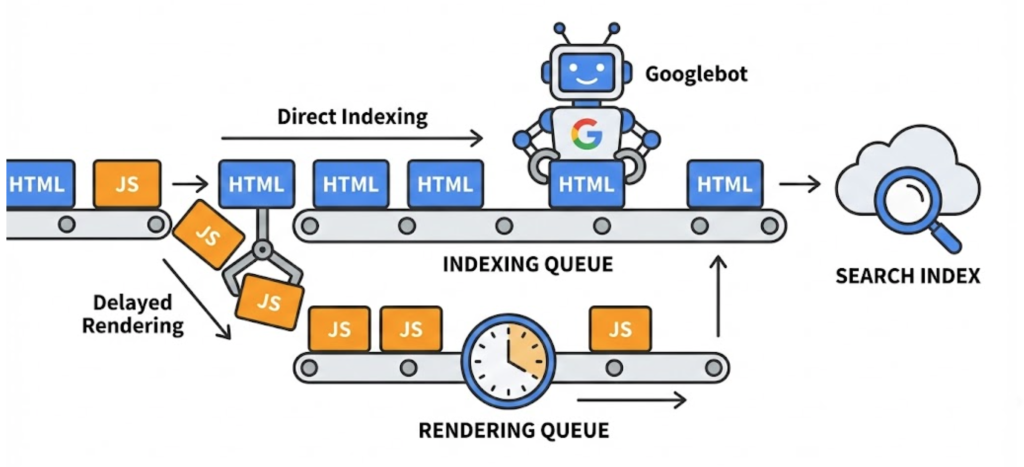
Google is smarter than it used to be. It can run JavaScript, but it doesn’t do it immediately. This is known as the Two-Wave Indexing process.
- Wave 1 (The Crawl): Googlebot visits your URL. It downloads the initial HTML. If that HTML is empty (because the content is hidden in JS), Google moves on.
- The Queue (The Gap): Google adds your page to a “Rendering Queue.” This is a waiting room. Because running JavaScript is expensive (it uses a lot of computing power), Google delays it. This delay can be hours, days, or even weeks.
- Wave 2 (The Render): Finally, Google’s “Web Rendering Service” (WRS) runs your JavaScript, sees the content, and updates the index.
If you rely on Wave 2, your content is always out of date, and you are wasting your Crawl Budget.
Here’s a quick visualisation to show how Googlebot treats HTML & JS files distinctly:
3 Common JavaScript SEO Killers
Even if Google eventually renders your page, poor coding practices can still kill your SEO. These are the three most common mistakes we fix.
1. The “Button” Trap (Links that aren’t Links)
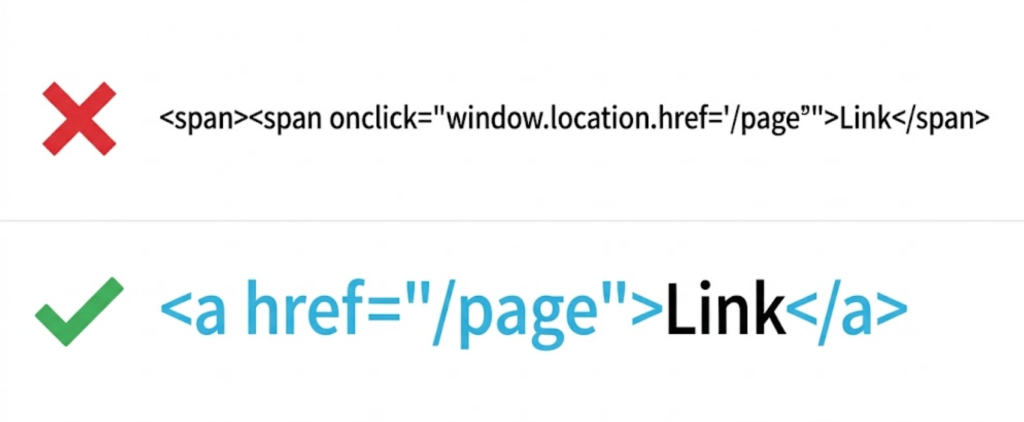
Googlebot crawls the web by following links. Specifically, it looks for <a href="..."> tags.
Developers often use JavaScript events to act like links. This works for users, but Google cannot click these.
- Bad (Google ignores this):
<span onclick="goToPage('/about')">About Us</span> - Good (Google follows this):
<a href="/about">About Us</a>
2. The “Soft 404” Error
On a normal site, if a page doesn’t exist, the server sends a “404 Not Found” code. On a JavaScript app, the server might send a “200 OK” code (saying “I found the app!”), and then the JavaScript shows a “Page Not Found” message.
To Google, this looks like a real page with thin content. It indexes thousands of blank error pages, destroying your site’s authority.
3. Lazy Loading Without Noscript
Lazy loading images is great for speed. But if you rely solely on scroll events to load images, Googlebot (which doesn’t “scroll” like a human) might never see them. You must ensure images are loaded in the DOM or provide a <noscript> fallback.
Solutions: How to Fix It
You don’t have to rebuild your site from scratch. There are three main architectural patterns we use to fix JavaScript SEO issues.
1. Server-Side Rendering (SSR)
The Gold Standard. Instead of making the user’s browser build the page, the server builds it before sending it. When Googlebot arrives, it gets the full HTML immediately. Frameworks like Next.js (for React) or Nuxt.js (for Vue) are built for this.
2. Static Site Generation (SSG)
The Speed King. You pre-build every single page on your site as a static HTML file during your “build” process. When a user (or bot) asks for a page, the server just hands over the file. It is instant and perfectly readable by Google.
3. Dynamic Rendering
The Compromise. This is often used for legacy sites where rebuilding is too hard. You set up your server to detect who is visiting.
- If it’s a Human: Send them the normal, heavy JavaScript app.
- If it’s a Bot (Googlebot): Send them a pre-rendered, flat HTML version of the page.
Technical Nuance: The “Hashbang” URL
If your URLs look like this: example.com/#/about, you have a problem. The # (fragment identifier) was traditionally ignored by Google.
While Google is better at this now, using “Hash” routing is a strong signal that you are using an old Client-Side Rendering method. You must configure your router to use the History API (clean URLs like example.com/about) to ensure proper indexing.
The Diagnostic Test
How do you know if you have this problem?
- Right-click your webpage and select “View Source” (not “Inspect Element”).
- Search for your main headline or a unique sentence from your text.
- If you can’t find the text in the source code, it means your content is being generated by JavaScript. Google might be struggling to see it.
The Takeaway
JavaScript is a powerful tool for building user experiences, but it can be a silent killer for SEO if mismanaged.
You should not have to choose between a “fancy” site and a “rankable” site. By using Server-Side Rendering or Static Generation, you can have both.
At Saint Digital, our web design and technical teams work together. We ensure your application is built on architecture that Google loves, preventing the “invisible website” syndrome.
Is your shiny new app failing to rank? Let’s look at the code.
Is your code killing your traffic?
You built a modern, fast website, but Google is treating it like a blank page. Don’t let technical debt hold you back.
At Saint Digital, we bridge the gap between developers and SEOs. Request a Technical Audit today, and we will reveal exactly what Googlebot sees when it visits your site.
Learn more from our Glossary
© Saint Digital Ltd, 2020-26, all rights reserved.