
Lazy Loading

What is Lazy Loading? (The “Speed Hack” That Stops Your Site Crashing)
Imagine you walk into a massive art gallery. The gallery has 5,000 paintings.
In a normal gallery, you walk in and see the paintings on the wall as you walk past them. It’s a smooth, enjoyable experience.
But imagine if the gallery forced you to stand at the front door and wait until the staff had brought all 5,000 paintings out of storage and stacked them in front of you before you were allowed to take a single step inside.
You would leave. It would take hours. You don’t need to see painting #4,999 yet—you haven’t even seen #1.
This is how most websites work by default. They try to load every single image, video, and script on the page the moment you arrive. This kills your Page Speed and burns your user’s mobile data.
The solution is Lazy Loading.
Welcome to the decoder ring. Lazy Loading is a performance technique that defers the loading of non-critical resources (like images and videos) until the exact moment the user needs them.
At Saint Digital, we enable Lazy Loading on every site we build. It is the single most effective way to make a media-heavy page load instantly.
Is your site failing Core Web Vitals?
Slow-loading images are a primary cause of poor LCP scores. Learn how to audit and fix your site performance in our complete technical guide.
How It Works: “Just in Time” Delivery
Lazy Loading works by splitting your page into two distinct zones:
- Above the Fold: The content visible on the screen immediately when the site loads.
- Below the Fold: The content hidden further down the page that you have to scroll to see.
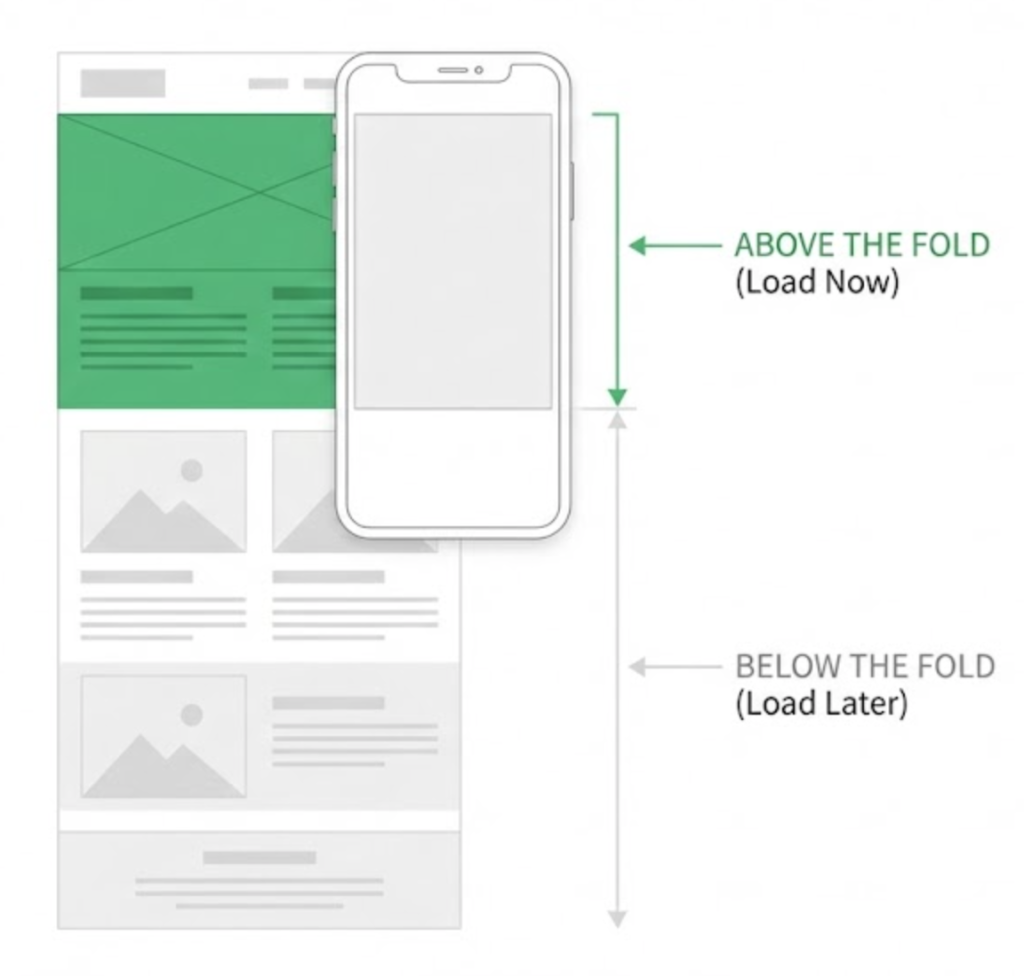
When a user visits a lazy-loaded site, the browser only downloads the images “Above the Fold.”
The images “Below the Fold” are ignored. They are replaced by tiny, invisible placeholders (often 1×1 pixel). As the user scrolls down, the browser detects when an image is about to come into view (usually using a “threshold” of 300px before it appears) and quickly downloads it just in time.
To the user, the experience is seamless. They never know the image wasn’t there all along. To the server, it saves massive amounts of bandwidth.
Why Lazy Loading is Vital for SEO
Google loves fast sites. But specifically, Google cares about a metric called LCP (Largest Contentful Paint).
LCP measures how fast the main content (usually the Hero Image or Headline) appears on the screen. It is a “Core Web Vital.”
If your browser is busy trying to download a huge footer image 5,000 pixels down the page, it has less bandwidth available to download the Hero Image at the top. This “bandwidth contention” delays your LCP, hurting your rankings.
By Lazy Loading the bottom images, you free up the browser to focus 100% of its energy on the top images. This makes your site feel instant.
The “Infinite Scroll” Effect
You interact with lazy loading every day. Think about Instagram or Facebook.
You can scroll down your feed forever. Does Instagram load all 10 billion photos on their server when you open the app? No. They load the next 3 posts as you scroll. This is “Infinite Scroll,” and it is powered entirely by lazy loading logic.
Native vs. JavaScript Lazy Loading
In the past (pre-2019), developers needed heavy JavaScript plugins to make this work. Today, it is much simpler.
Modern browsers (Chrome, Safari, Firefox) support “Native Lazy Loading.” You simply add a tiny attribute to your HTML image tag:
<img src="image.jpg" loading="lazy" alt="My Image">
That’s it. The loading="lazy" attribute tells the browser: “Don’t prioritize this. Load it later.” We ensure every non-critical image on your site has this tag.
The Two Critical Mistakes (How to Break Your Site)
Lazy loading is powerful, but dangerous if used incorrectly. Here are the two traps we see constantly in our audits.
Mistake 1: Lazy Loading the Hero (The LCP Killer)
This is the #1 error. Do NOT Lazy Load your Hero Image.
Why? Because that image is “Above the Fold.” The user needs to see it immediately. If you add loading="lazy" to the very first image on the page, the browser will wait until the layout is calculated before it even starts downloading the image. You are intentionally delaying the most important element.The Saint Digital Rule:
- Top Image (Hero) =
loading="eager"(Load immediately) - All other images =
loading="lazy"(Load later)
Mistake 2: The “CLS” Trap (Jumping Content)
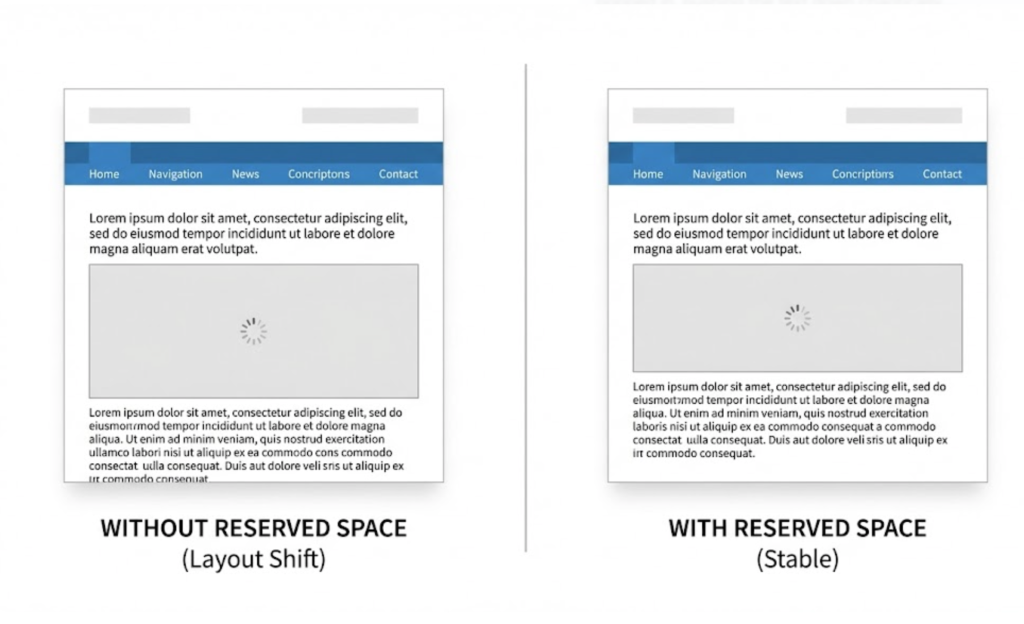
Have you ever been reading an article, and suddenly a photo pops in above the text, pushing the paragraph you were reading down the screen? It makes you lose your place.
This is called Cumulative Layout Shift (CLS), and Google hates it.
It happens when you lazy load an image but don’t tell the browser how big it is. The browser thinks the image is 0px high. When the image loads, it expands to 500px high, pushing everything else down.
The Fix: Always define width and height attributes on your image tags. This reserves the empty space for the image before it loads, preventing the jump.
Advanced Strategy: The “Facade” Pattern for Video
Images are heavy (100KB). Videos are massive (10MB+).
If you embed a YouTube video on your page, it downloads a huge amount of JavaScript code even if the user never clicks play. This kills your speed scores.
We use a technique called the “Facade Pattern.” Instead of loading the real YouTube player, we load a lightweight static image (Thumbnail) that looks like the player. When the user clicks “Play,” then (and only then) do we instantly swap the image for the actual video player. This saves huge amounts of data.
The Takeaway
Lazy Loading is about efficiency. It is about respecting your user’s data plan, their battery life, and their patience.
It allows you to build rich, beautiful, image-heavy websites without paying the “speed tax.” You get the best of both worlds: high-quality visuals and lightning-fast performance.
At Saint Digital, our web design services engineer speed into the code. We ensure your hero assets load instantly, while your heavy footer assets wait their turn.
Is your site trying to do too much at once? Let’s optimize the load.
Speed up your site instantly.
You don’t need to delete your images to make your site fast; you just need to load them smarter. We at Saint Digital implement advanced Lazy Loading strategies for images and video. We make your site feel instant without sacrificing visual quality.
Let’s boost your speed.
Learn more from our Glossary
© Saint Digital Ltd, 2020-26, all rights reserved.