
Core Web Vitals

What are Core Web Vitals? (Google’s “Annoyance Score”)
For years, everyone asked the same question: “Does my website load fast?”
But “fast” is vague. In 2020, Google decided to stop guessing. They introduced a specific set of metrics to measure exactly how a user experiences a webpage. They called them Core Web Vitals (CWV).
These aren’t just vanity metrics. They are a confirmed Google Ranking Factor.
Welcome to the decoder ring. Core Web Vitals are Google’s way of quantifying annoyance. They measure if your site is slow, if it feels “broken” when you click a button, or if the layout jumps around unexpectedly.
At Saint Digital, we build every single website to pass this test. Why? Because a site that fails Core Web Vitals isn’t just annoying Google; it’s annoying your customers and driving up your Bounce Rate.
Is your site failing the speed test?
You can’t fix what you can’t measure. If your site feels sluggish or is failing in Search Console, you need a Technical Audit to find the bottleneck. Learn how in our technical guide.
The Three Pillars of Core Web Vitals
Google breaks the “user experience” down into three specific moments. To pass the test, you need to score “Green” (Good) on all three.
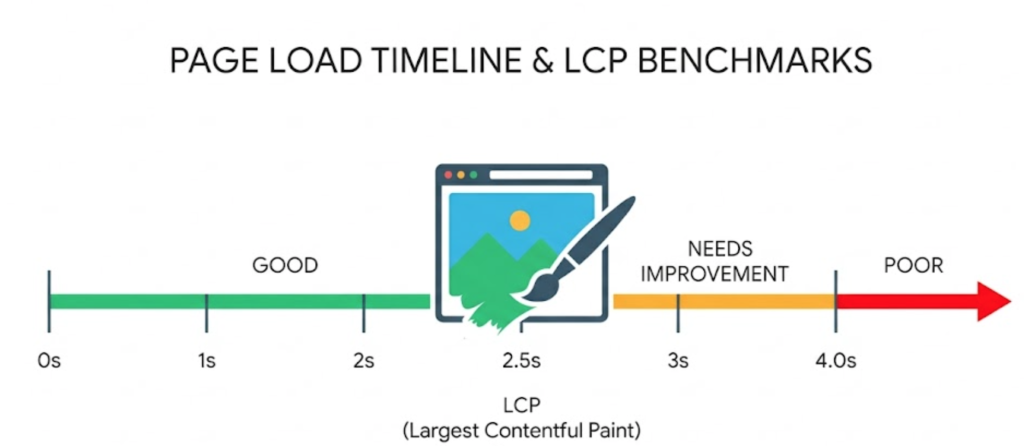
1. LCP: Largest Contentful Paint (The “Loading” Speed)
The Question: “How long does it take for the main content to actually appear?”
Forget “total load time.” Users care about the main thing they came to see—usually the big image or headline in your Hero Section.
LCP measures the time from when the user clicks a link to when the *largest* element on the screen is fully visible.
- Good (Green): 2.5 seconds or less.
- Needs Improvement (Orange): Between 2.5 and 4.0 seconds.
- Poor (Red): More than 4.0 seconds.
2. INP: Interaction to Next Paint (The “Responsiveness”)
(Note: This metric replaced the old “FID” metric in March 2024).
The Question: “When I click a button, does the site react instantly, or does it freeze?”
It measures the delay between your input (a tap or click) and the browser being able to paint the next frame (showing you the result).
- Good (Green): 200 milliseconds or less.
- Needs Improvement (Orange): Between 200 and 500 milliseconds.
- Poor (Red): More than 500 milliseconds.
[Image of inp interaction diagram]
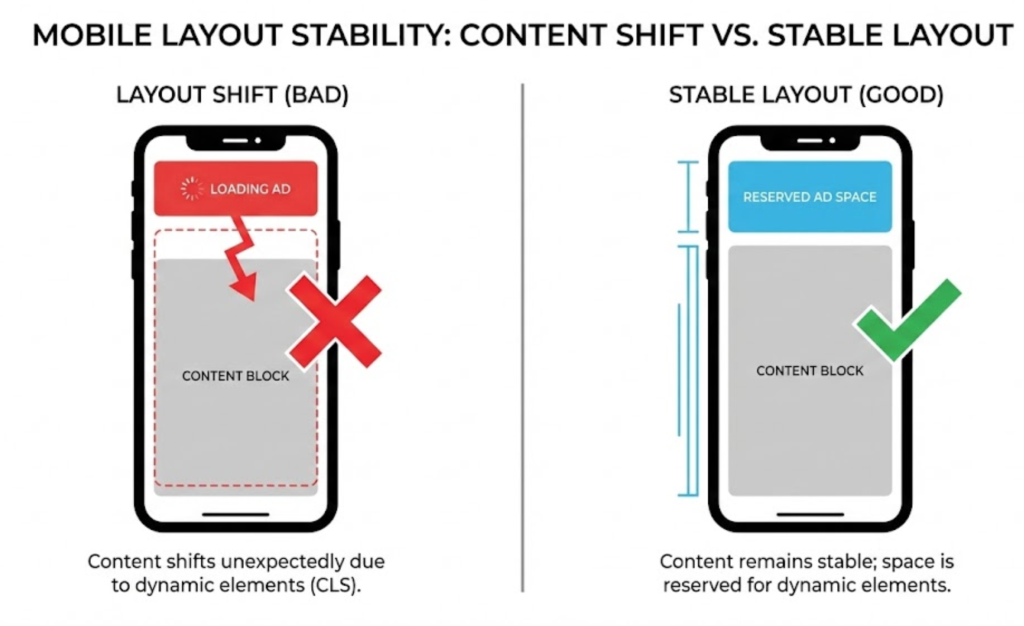
3. CLS: Cumulative Layout Shift (The “Visual Stability”)
The Question: “Does the page jump around while I’m trying to read it?”
This is the most annoying one. You go to click a link, and suddenly an ad pops in, pushing the content down, and you click the wrong thing. Rage ensues.
- Good (Green): A score of 0.1 or less.
- Needs Improvement (Orange): Between 0.1 and 0.25.
- Poor (Red): More than 0.25.
Technical Insight: Why INP Replaced FID
Google killed the old metric (FID) because it only measured the first click. But a user clicks many things during a visit.
INP (Interaction to Next Paint) measures the slowest interaction across the entire visit. It forces developers to optimize the “Main Thread” (the browser’s brain) to ensure it is never too busy running JavaScript to respond to a user. This is why minimizing bloated code is now critical.
Why Do Core Web Vitals Matter?
Google tests your site based on real-world user data (from the Chrome User Experience Report), often simulating a slow 4G mobile connection.
1. Confirmed Ranking Factor
Since 2021, Core Web Vitals have been part of Google’s “Page Experience” signals. In competitive industries, this technical edge is often the difference between page 1 and page 2.
2. Impact on Conversions
Google found that when a site meets the CWV thresholds, users are 24% less likely to abandon page loads. If your LCP is slow, users bounce. Passing Core Web Vitals helps customers give you money.
The Confusion: Field Data vs. Lab Data
This is the “Pro Tip” that saves headaches. You might score 90/100 on a test but still “Fail” in Search Console.
- Lab Data (The Simulation): A test run right now. Useful for debugging.
- Field Data (The Reality): The data Google uses for ranking. It comes from real users visiting your site over the last 28 days (CrUX Report). If your users have slow phones, your score will suffer.
The Takeaway
Core Web Vitals are the bridge between “Web Design” and “SEO.” You can’t “Design” a fast site without technical knowledge.
At Saint Digital, our web design services build for these metrics. We design sites that are visually stable (low CLS), coded efficiently (low INP), and hosted on lightning-fast servers (fast LCP).
If your report card is full of red and orange, let’s turn it green.
Is your website failing the test?
If your Core Web Vitals are “Poor,” you are losing rankings and customers. We at Saint Digital are performance obsessives. We audit, code, and optimize websites to hit that “Green” score across the board.
Ready to speed up? Let’s dive under the hood and fix your vitals.
Learn more from our Glossary
© Saint Digital Ltd, 2020-26, all rights reserved.