
Knowledge Graph
What is the Knowledge Graph? (How to Become a “Fact” on Google)
Have you ever Googled a famous brand, a celebrity, or a classic movie? You didn’t just get a list of ten blue links.
You got a massive, beautiful box of information on the right-hand side of the screen. It had photos, social media profiles, a bio, facts, figures, and related searches. It looked like a digital encyclopaedia entry.
That box is called a Knowledge Panel. Here’s Thomas Edison starring in his:
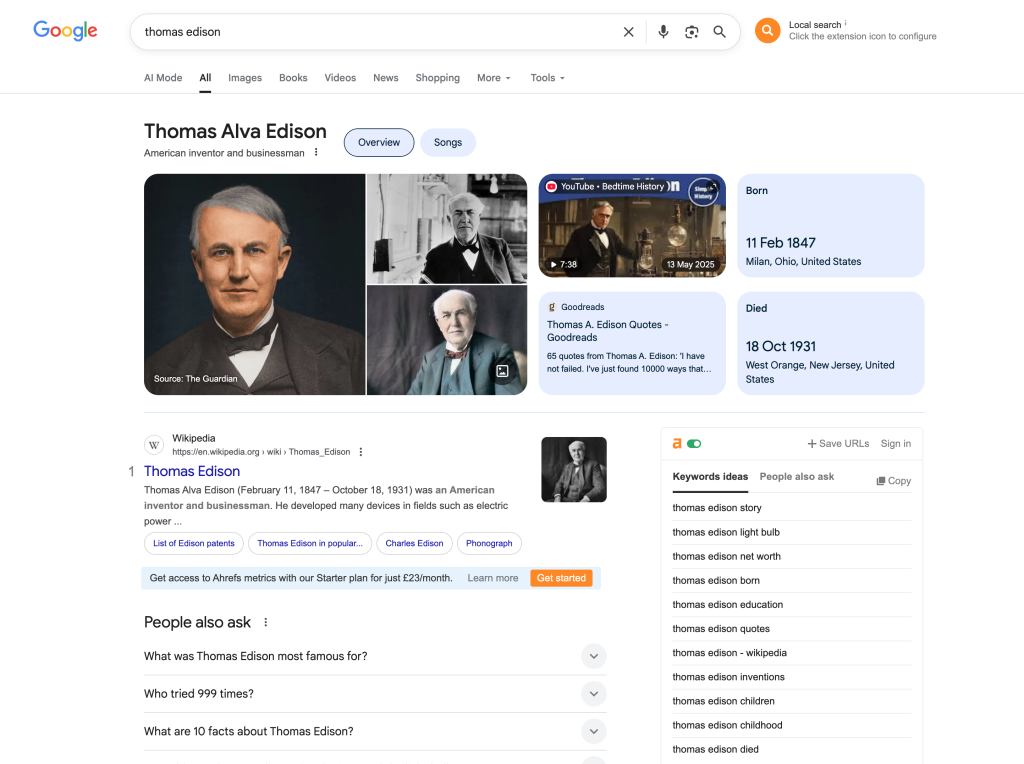
And the massive, intelligent brain that powers all this is called the Google Knowledge Graph.
For most business owners, getting that “VIP Box” feels impossible—something reserved for Nike, Coca-Cola, or Brad Pitt. But it’s not. It is simply a matter of technical communication.
Welcome to the decoder ring. The Knowledge Graph is Google’s way of organising the world’s information into “facts” rather than just “websites.” Getting into the Graph is the ultimate signal of E-E-A-T (Authority and Trust). It tells the world: “Google knows exactly who we are, and it trusts us.”
At Saint Digital, we help brands build the technical signals that earn this level of recognition. Here is the blueprint.
Is Google confused about your brand?
Becoming an “Entity” requires precise technical signals like Schema markup. Learn how to translate your brand into code Google understands in our complete technical guide.
The Shift: From “Strings” to “Things”
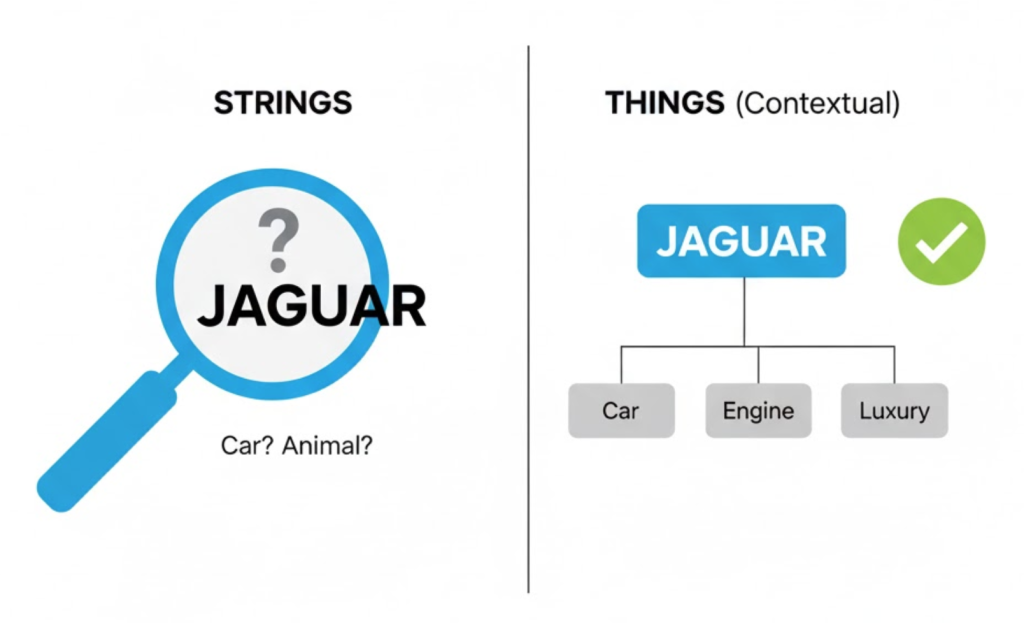
To understand the Knowledge Graph, you have to understand how Google used to think (pre-2012) vs. how it thinks now.
The Old Google (Strings)
If you searched for “Jaguar,” Google just looked for the string of letters “J-a-g-u-a-r” on webpages. It didn’t know if you meant the luxury car, the jungle cat, or the American football team. It was just a pattern-matching robot.
The New Google (Things)
Google now thinks in Entities. It understands that a “Jaguar” is a thing (an animal) or a brand (a car manufacturer). It understands the connections between them.
The Knowledge Graph is the database of all these “Entities.” It connects facts like a giant spiderweb. It knows that “Saint Digital” is an Organisation, located in Leeds, founded by [Founder Name], that offers Web Design.
When Google is confident enough in these facts, it awards you a Knowledge Panel.
Why Do You Want a Knowledge Panel?
It’s not just about ego (although looking like a big brand is nice). It has massive, tangible business benefits.
1. Immediate Trust (The “Real Business” Signal)
When a user searches for your brand name and sees a Knowledge Panel, their subconscious says, “This is a legitimate, established company.” It sets you apart from the fly-by-night competitors who just have a simple blue link. It drastically improves conversion rates.
2. Brand Protection (Dominate the Screen)
On desktop, the Knowledge Panel takes up the entire right-hand side of the search results. On mobile, it appears at the very top. You effectively “own” the search result for your brand name, pushing competitors and ads off the screen.
3. AI & Voice Search Optimisation
This is crucial for the future. When you ask Siri, Alexa, or the new Google AI Overviews a question (“Who is Saint Digital?”), it doesn’t read a website; it reads the Knowledge Graph entry. If you aren’t in the Graph, you are invisible to AI.
The Strategy: How to “Get” a Knowledge Panel
There is no application form. You cannot pay Google to create one. You have to influence Google to create one for you by building up its “Confidence Score.”
You do this by connecting the dots for Google until it is 100% confident in who you are. Here is the 4-step blueprint we use.
Step 1: The “Home Base” (JSON-LD Schema)
This is the technical “secret sauce.” We discussed this in our JSON-LD article.
We add “Organization” Schema markup to your homepage. This code explicitly tells Google: “Our name is Saint Digital. Here is our logo. Here are our official social media profiles.” This acts as the “Entity Home”—the source of truth.
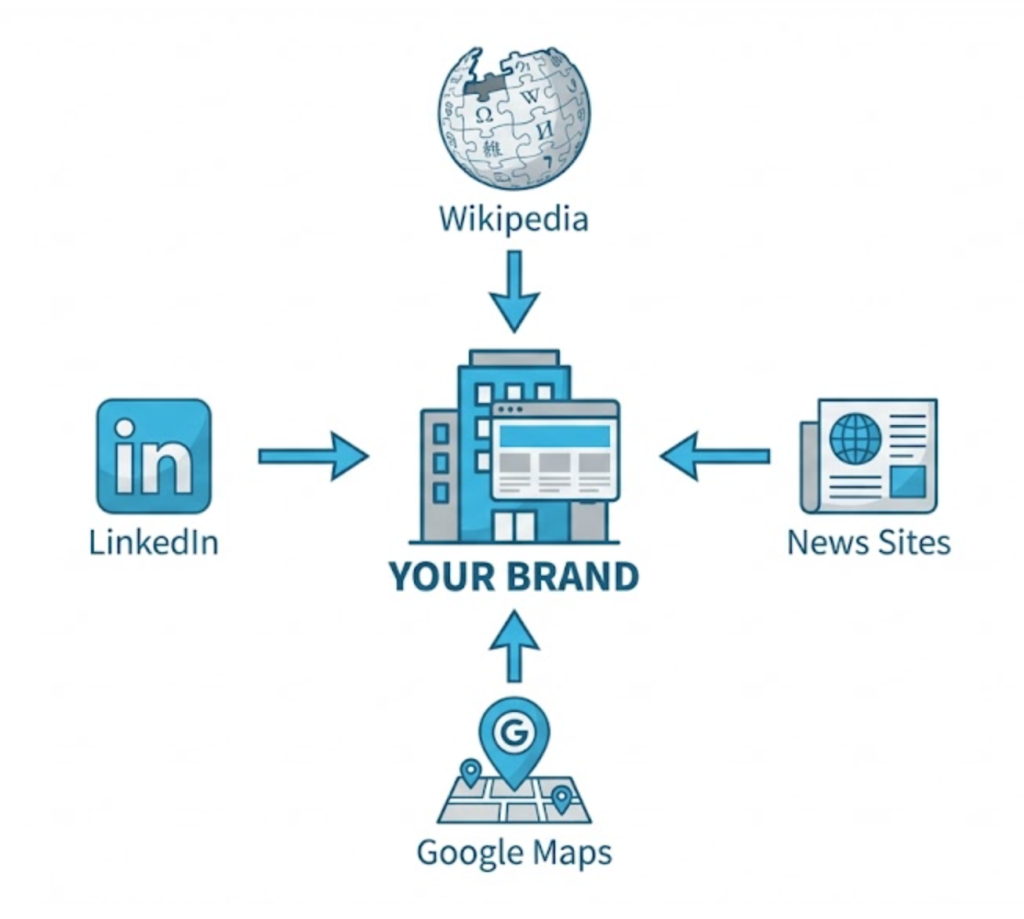
Step 2: Corroboration (Third-Party Proof)
Google doesn’t just take your word for it. It looks for other authoritative websites that confirm your existence.
This is where Backlinks and PR come in. If you are mentioned on Wikipedia (the gold standard), Crunchbase, reputable news sites (BBC, Forbes), or industry directories, Google “connects the dots.” It sees that trusted sources agree on who you are.
Step 3: The “SameAs” Connection
Google gets confused easily. If your Facebook page says you were founded in 2010, but your LinkedIn says 2012, Google loses confidence and won’t build a panel.
We use the sameAs property in your code to link your website to your LinkedIn, Facebook, YouTube, and Google Business Profile. This creates a closed loop of trust.
Step 4: Google Business Profile (For Local Entities)
If you have a physical location, verifying a Google Business Profile is the cheat code. It almost guarantees a local Knowledge Panel because you have verified your physical existence via postcard.
Technical Insight: The “Confidence Score”
Think of the Knowledge Graph as a strict bouncer. It has a threshold. Let’s call it a “Confidence Score” of 90/100.
- Your website says you exist? +20 points.
- Your LinkedIn matches your website? +10 points.
- A Wikipedia link cites you? +40 points.
- A news article mentions you? +10 points.
Once you cross that threshold, the Knowledge Panel appears automatically. Our job is to stack these signals until the bouncer lets you in.
How to “Claim” Your Knowledge Panel
Once Google creates a panel for you, you will see a little button at the bottom: “Own this business?” or “Claim this knowledge panel.”
Click it.
Google will ask you to verify your identity (usually via Search Console). Once verified, you can edit the information! You can choose the featured image, update the stats, and control how your brand looks to the world.
The Takeaway
The Knowledge Graph is the future of search. Google is moving away from being a “search engine” (finding links) to being an “answer engine” (providing facts).
Getting into the Knowledge Graph is the ultimate proof that you have built a strong, technically sound, and authoritative brand.
At Saint Digital, we don’t just build websites; we build Entities. We implement the advanced Schema markup and technical foundations that force Google to take notice of your brand.
Ready to become a verified fact on Google?
Become a VIP on Google
Getting a Knowledge Panel isn’t luck; it’s engineering. We at Saint Digital build the technical architecture (Schema and JSON-LD) that connects the dots for Google. We turn your business from a “website” into a recognized “entity.”
Ready to own your search results?
Learn more from our Glossary
© Saint Digital Ltd, 2020-26, all rights reserved.