
Meta Description
What is a Meta Description? (Your Shop Window’s Sales Pitch)
You have done the hard work. You’ve built the perfect page. You’ve targeted the right keywords. You’ve finally ranked on Page 1 of Google.
But the battle isn’t over. In fact, the hardest part has just begun.
You are now sitting on a shelf next to nine of your fiercest competitors. The user is scanning the list rapidly. They have to make a split-second decision: “Which one of these ten links do I trust enough to click?”
The factor that often sways that decision is the Meta Description.
Welcome to the decoder ring. A Meta Description is the short snippet of grey text (usually about two lines) that appears underneath your blue link (Title Tag) in the search results.
Many people think this text is for Google’s robots. It isn’t. It is for the humans. It is your elevator pitch, your shop window display, and your free ad copy, all rolled into 160 characters.
At Saint Digital, we don’t just “fill in the blank” for this tag. We write psychological hooks designed to steal the click from the guy ranking above you.
Don’t let your rankings go to waste.
High rankings mean nothing if no one clicks. Learn how to optimize your metadata to skyrocket your Click-Through Rate (CTR) in our complete SEO framework.
The “Not a Ranking Factor” Myth
Let’s clear up the biggest misunderstanding in SEO right now.
Google does not use the keywords in your Meta Description to rank your website.
You could stuff the word “plumber” into your description 50 times, and it wouldn’t help you rank one spot higher for the term “plumber.” Google stopped using this as a direct ranking signal years ago to prevent spam.
So, why do we bother writing them?
Because of CTR (Click-Through Rate).
While the description doesn’t influence rank, it massively influences clicks. And guess what? If more people click on your result than the competitor ranking above you, Google notices. A consistently high CTR is a strong signal that you are the best answer, which can eventually boost your rankings. So, indirectly, it is one of the most powerful SEO tools you have.
The Anatomy of a Perfect Description
Writing a great description is an art form. You have very limited space to persuade a stranger to visit your site. Here is the 4-step formula we use at Saint Digital.
1. The Length (The “Goldilocks” Zone)
Google cuts off descriptions that are too long. It adds a “…” (ellipsis) at the end, which looks messy and might cut off your punchline.
- Desktop Limit: ~160 characters.
- Mobile Limit: ~120 characters.
The Saint Digital Rule: Aim for 150-155 characters. This is the sweet spot that conveys a full message while looking good on almost every device.
2. The Active Voice (Start with a Verb)
Don’t be passive. Don’t say: “This is a page about web design services that are offered by us.” (Boring).
Start with a command or an action verb. Tell the user what to do.
- “Get…”
- “Learn…”
- “Discover…”
- “Shop…”
Example: “Discover the secrets of Local SEO and how to dominate your area.”
3. The Benefit (The “What’s in it for me?”)
Users don’t care about you; they care about their problem. Your description must promise a solution.
- Bad: “Saint Digital is a Leeds-based agency established in 2024.” (Who cares?)
- Good: “Boost your rankings and drive revenue with data-driven SEO strategies.” (Oh, I want revenue!)
4. The “Bold” Keyword Hack
Remember I said keywords don’t help you rank? That’s true. But they do help you get clicks.
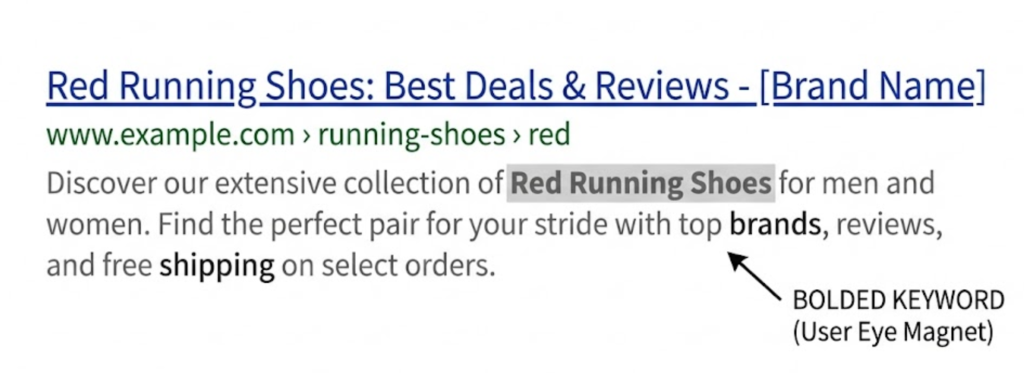
If a user searches for “Red Running Shoes” and your description contains the phrase “Red Running Shoes”, Google will bold that text in the search result. This bold text acts like a magnet for the user’s eye. It proves relevance. So, always include your target keyword in the description—not for the algorithm, but for the user’s eye.
Technical Pro-Tip: Pixels vs. Characters
While we say “160 characters,” computers actually measure in Pixels (approx 920px width).
Because a “W” is much wider than an “i”, you can sometimes get cut off even if you are under the character limit. We use simulation tools to ensure your message fits perfectly within the pixel limit.
See the below visualisation to understand why character count can’t always be relied upon:

The “Google Rewrite” Frustration
Here is the frustrating part of modern SEO. You can write the perfect, 155-character, benefit-driven masterpiece… and Google might ignore it.
Studies show that Google rewrites Meta Descriptions about 70% of the time. Instead of showing your text, Google might pull a random sentence from your page that it thinks answers the user’s specific question better.
Should you give up? Absolutely not.
- Google tends to use your description more often when the search is high-intent (Commercial or Transactional). These are the money searches.
- Even if Google rewrites it, writing a good description forces you to clarify the value proposition of the page, which improves your on-page content.
Real World Examples: Good vs. Bad
Let’s look at how we would write descriptions for a hypothetical client selling “Organic Coffee Beans.”
❌ The Bad Description:
“Welcome to our coffee page. We sell coffee beans that are organic and really nice. Check out our website for more info on prices and shipping.”
(Critique: Passive voice, boring, wasted characters, no unique selling point.)
✅ The Saint Digital Description:
“Shop the world’s best Organic Coffee Beans. Ethically sourced, freshly roasted in Leeds, and delivered to your door. Get 10% off your first order today!”
(Critique: Starts with active verb “Shop,” includes keyword for bolding, highlights “Ethical/Fresh” benefits, and ends with a discount hook.)
The Takeaway
Your Meta Description is your “digital handshake.” It’s the first interaction a potential customer has with your brand, often before they even land on your site.
It’s small, but it’s mighty. It’s the difference between being seen on Google and being visited.
At Saint Digital, our SEO services obsess over these 160 characters. We treat them like expensive ad copy. We write, test, and refine them to ensure that when your site appears in the search results, it’s the one people can’t resist clicking.
Win the click – not just the rank.
Ranking #1 is useless if nobody clicks on you. We at Saint Digital are experts at “Search Engine Psychology.” We write compelling, click-worthy metadata that turns “impressions” into “visitors.”
Let’s make your website impossible to ignore.
Learn more from our Glossary
© Saint Digital Ltd, 2020-26, all rights reserved.