
SSL Certificate
What is an SSL Certificate? (And Why the “Not Secure” Warning is Killing Your Sales)
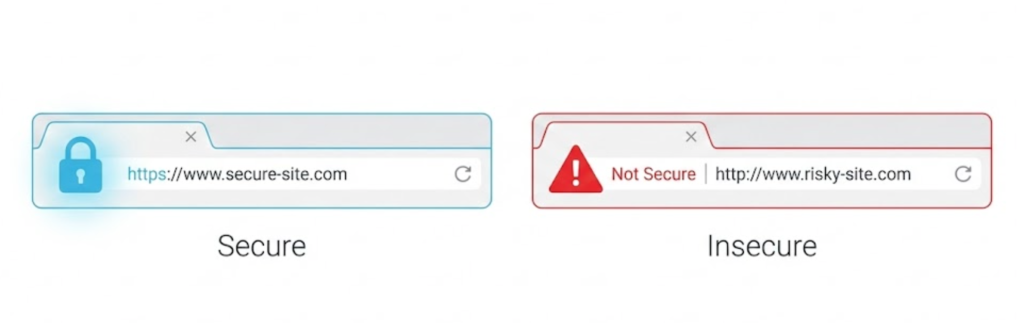
Have you ever visited a website and seen a scary red warning in your browser address bar that says “Not Secure”?
Do you stay on that site? Do you put your credit card details into it? No. You leave immediately.
That warning appears because the website is missing an SSL Certificate.
Welcome to the decoder ring. SSL (Secure Sockets Layer) is the standard security technology that establishes an encrypted link between a web server and a browser. It is the technology that turns “HTTP” into “HTTPS” and puts the reassuring grey Padlock icon next to your URL.
At Saint Digital, we believe security isn’t an “add-on.” It is the baseline requirement for doing business online. If your site doesn’t have SSL, you aren’t just risking data; you are destroying your conversion rate.
Is your website shouting “Unsafe”?
The “Not Secure” warning scares away 90% of visitors. Learn how to implement proper security protocols and migrate to HTTPS safely in our complete technical guide.
The Analogy: The Postcard vs. The Armoured Truck
To understand what SSL actually does, imagine sending a message to your friend across the country.
HTTP (No SSL) is like sending a Postcard.
You write your message (or credit card number) on the back. As that postcard travels through the postal system, anyone who handles it—the postman, the sorting office, the delivery driver—can read exactly what is written on it. It is completely open to interception.
HTTPS (With SSL) is like sending a Locked Armoured Truck.
Before the message leaves your house, you put it in a titanium box and lock it with a complex key. As it travels through the system, people can see the box moving, but they cannot see inside. Only the recipient has the specific key to open it.
SSL is that lock. It encrypts the data so that even if hackers intercept it, they just see scrambled nonsense.
How It Works: The “SSL Handshake”
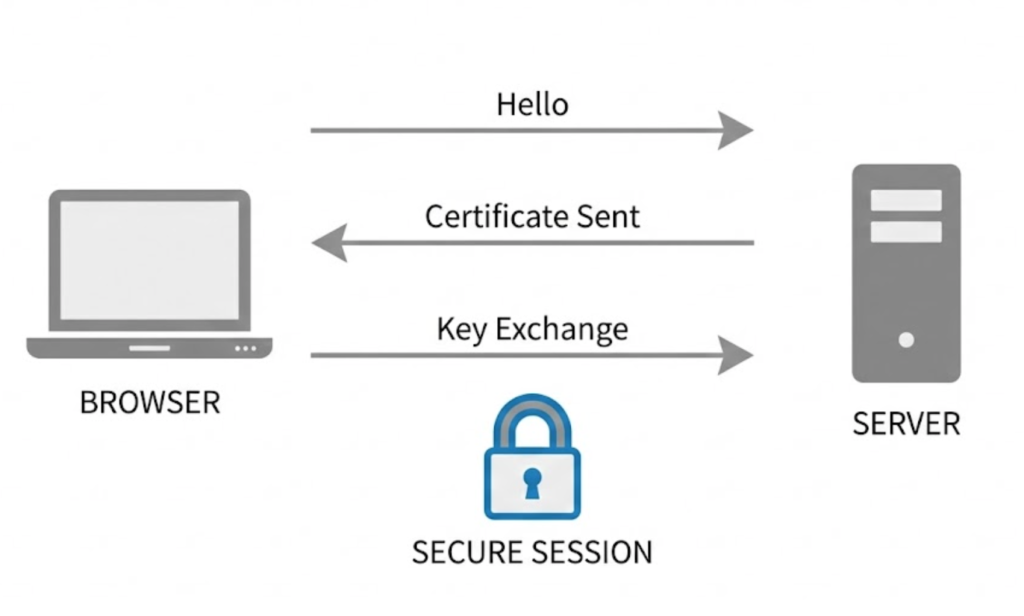
You might wonder how your browser knows it can trust the website. It happens in milliseconds via a process called the SSL Handshake.
- Hello: Your browser connects to a website (e.g., google.com) and asks for identification.
- Certificate: The website sends its SSL Certificate (its ID card).
- Validation: Your browser checks the ID against a list of trusted authorities. If it’s valid, it generates a unique “Session Key.”
- Encryption: The browser and server use this key to encrypt all data sent between them for the rest of your visit.
Why SSL is Critical for Business (The 3 Reasons)
You might think, “I don’t sell products, so I don’t need security.” You are wrong. Here is why.
1. The Trust Factor (The Chrome Warning)
In 2018, Google changed the game. Before then, they only marked secure sites. Now, the Chrome browser actively shames insecure sites. If your site uses HTTP, Chrome displays a “Not Secure” warning. If a user tries to fill out a contact form, that warning often turns red. This destroys trust and increases your Bounce Rate.
2. The SEO Factor (Ranking Signal)
Google wants a safe web. Since 2014, HTTPS has been a confirmed Ranking Signal. If two websites are equal in quality and backlinks, but one has SSL and the other doesn’t, the secure site will rank higher. In 2025, it is virtually impossible to rank on Page 1 without HTTPS.
3. Data Protection (GDPR)
Even if you don’t take payments, you probably have a contact form. That form collects names and email addresses. Under GDPR (General Data Protection Regulation), you have a legal duty to protect that data. Sending personal info over an unencrypted HTTP connection is a compliance nightmare.
Types of SSL Certificates
Not all padlocks are created equal. Depending on your business size, you might need a different level of validation.
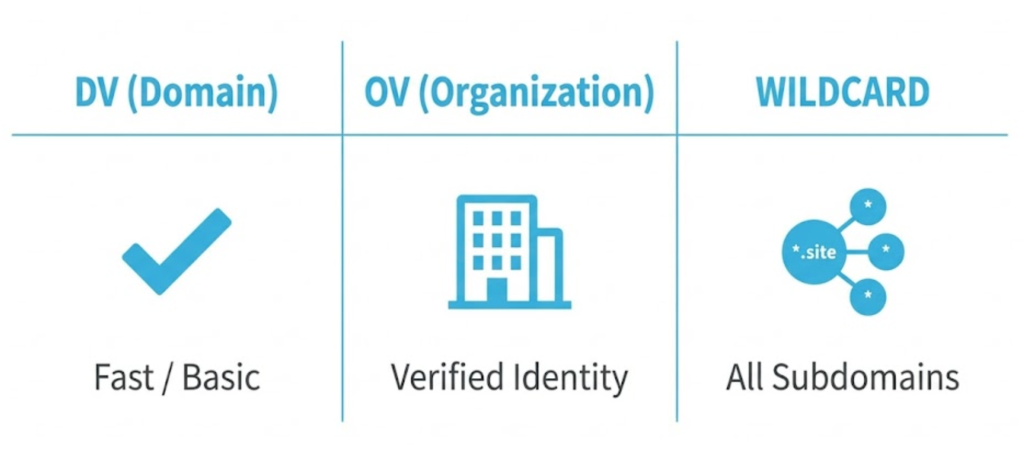
1. Domain Validation (DV)
Best for: Blogs, small business sites, portfolios.
How it works: The Certificate Authority checks that you own the domain name via email. It provides full encryption but minimal identity verification.
2. Organization Validation (OV)
Best for: Corporate sites, lead generation sites.
How it works: The Authority checks that you own the domain AND that your company is a legally registered business. It adds a layer of identity trust.
3. Wildcard SSL
Best for: Large sites with subdomains.
How it works: A standard certificate only protects www.site.com. A Wildcard certificate protects *.site.com, meaning it covers blog.site.com, shop.site.com, and mail.site.com all at once.
The “Mixed Content” Trap
This is a common technical issue we fix for clients. You install an SSL certificate. Your URL says “HTTPS.” But the padlock icon doesn’t appear.
This is called Mixed Content.
It means that while your page is secure, you are loading an image or a script on that page from an insecure (HTTP) source. Browsers block mixed content because it creates a backdoor for hackers. We audit sites to find these insecure assets and update them to ensure the padlock stays locked.
Free vs. Paid Certificates (Let’s Encrypt)
Do you need to pay for SSL? Not always.
- Free (Let’s Encrypt): A non-profit authority that provides free DV certificates. They are perfectly secure and recognized by Google. We use these for most standard brochures sites.
- Paid: You pay for higher validation levels (OV/EV), longer validity periods, and crucially, Warranty protection in case of a data breach caused by a certificate failure.
The Takeaway
SSL is no longer a “feature.” It is the floor.
An insecure website is a broken website. It scares away customers, it annoys Google, and it leaves you liable for data breaches.
At Saint Digital, we ensure every site we launch is fully encrypted. We handle the technical setup, the 301 Redirects from HTTP to HTTPS, and the mixed content audits.
Does your site have the padlock? If not, we need to talk.
a
Has your site been left unlocked?
If you don’t have the padlock, you don’t have trust. We at Saint Digital take security seriously. We implement robust SSL encryption on every project, ensuring your data is safe and your customers feel secure.
Let’s secure your site.
Learn more from our Glossary
© Saint Digital Ltd, 2020-26, all rights reserved.